<?xml version="1.0" encoding="utf-8"?><feed xmlns="http://www.w3.org/2005/Atom" ><generator uri="https://jekyllrb.com/" version="3.10.0">Jekyll</generator><link href="https://vladimirgorej.com/feed.xml" rel="self" type="application/atom+xml" /><link href="https://vladimirgorej.com/" rel="alternate" type="text/html" /><updated>2026-03-09T08:28:39+00:00</updated><id>https://vladimirgorej.com/feed.xml</id><title type="html">Vladimír Gorej’s Site</title><subtitle>Vladimír Gorej is a Prague-based software engineer. Passionate with software/code quality, Functional and Reactive programming.</subtitle><author><name>Vladimír Gorej</name></author><entry><title type="html">Advanced memoization for JavaScript functions with lodash.memoize</title><link href="https://vladimirgorej.com/blog/advanced-memoization-for-javascript-functions-with-lodash-memoize/" rel="alternate" type="text/html" title="Advanced memoization for JavaScript functions with lodash.memoize" /><published>2022-02-05T18:00:00+00:00</published><updated>2022-02-05T18:00:00+00:00</updated><id>https://vladimirgorej.com/blog/advanced-memoization-for-javascript-functions-with-lodash-memoize</id><content type="html" xml:base="https://vladimirgorej.com/blog/advanced-memoization-for-javascript-functions-with-lodash-memoize/"><![CDATA[<blockquote class="blockquote lead">
  <p>
    "In computing, memoization or memoisation is an optimization technique used primarily to speed up 
    computer programs by storing the results of expensive function calls and returning the cached result
    when the same inputs occur again."
  </p>
  <footer class="blockquote-footer"><cite title="Wikipedia on Memoization">Wikipedia on Memoization</cite></footer>
</blockquote>

<p><a href="https://lodash.com/" target="_blank" rel="noopener noreferrer">Lodash</a> is a modern JavaScript utility library delivering modularity, performance &amp; extras.
It’s a ubiquitous library, and your project probably uses it, even if you’re not aware of it.
Lodash contains an implementation of memoization in the form of <a href="https://lodash.com/docs/4.17.15#memoize" target="_blank" rel="noopener noreferrer">memoize</a> function.</p>

<p>By default, memoize function only uses the first argument provided to the memoized function as the cache key. 
Here is the simplest possible example of memoization:</p>

<figure class="highlight"><pre><code class="language-javascript" data-lang="javascript"><table class="rouge-table"><tbody><tr><td class="gutter gl"><pre class="lineno">1
2
3
4
5
6
7
8
</pre></td><td class="code"><pre><span class="kd">const</span> <span class="p">{</span> <span class="nx">memoize</span> <span class="p">}</span> <span class="o">=</span> <span class="nx">require</span><span class="p">(</span><span class="dl">'</span><span class="s1">lodash</span><span class="dl">'</span><span class="p">);</span>

<span class="kd">const</span> <span class="nx">func</span> <span class="o">=</span> <span class="p">(</span><span class="nx">arg1</span><span class="p">)</span> <span class="o">=&gt;</span> <span class="s2">`My name is </span><span class="p">${</span><span class="nx">arg1</span><span class="p">}</span><span class="s2">`</span>
<span class="kd">const</span> <span class="nx">funcM</span> <span class="o">=</span> <span class="nx">memoize</span><span class="p">(</span><span class="nx">func</span><span class="p">);</span>

<span class="nx">console</span><span class="p">.</span><span class="nx">dir</span><span class="p">(</span><span class="nx">funcM</span><span class="p">(</span><span class="dl">'</span><span class="s1">John</span><span class="dl">'</span><span class="p">));</span> <span class="c1">// =&gt; 'My name is John'</span>
<span class="nx">console</span><span class="p">.</span><span class="nx">dir</span><span class="p">(</span><span class="nx">funcM</span><span class="p">(</span><span class="dl">'</span><span class="s1">John</span><span class="dl">'</span><span class="p">));</span> <span class="c1">// =&gt; 'My name is John' (cache hit)</span>
<span class="nx">console</span><span class="p">.</span><span class="nx">dir</span><span class="p">(</span><span class="nx">funcM</span><span class="p">.</span><span class="nx">cache</span><span class="p">.</span><span class="nx">size</span><span class="p">);</span> <span class="c1">// =&gt; 1</span>
</pre></td></tr></tbody></table></code></pre></figure>

<p>It’s important to realize that the cache key of the memoized function is determined using <a href="https://tc39.es/ecma262/multipage/abstract-operations.html#sec-samevaluezero" target="_blank" rel="noopener noreferrer">SameValueZero</a> comparison:</p>

<figure class="highlight"><pre><code class="language-javascript" data-lang="javascript"><table class="rouge-table"><tbody><tr><td class="gutter gl"><pre class="lineno">1
2
3
4
5
6
7
8
</pre></td><td class="code"><pre><span class="kd">const</span> <span class="p">{</span> <span class="nx">memoize</span> <span class="p">}</span> <span class="o">=</span> <span class="nx">require</span><span class="p">(</span><span class="dl">'</span><span class="s1">lodash</span><span class="dl">'</span><span class="p">);</span>

<span class="kd">const</span> <span class="nx">func</span> <span class="o">=</span> <span class="p">(</span><span class="nx">arg1</span><span class="p">)</span> <span class="o">=&gt;</span> <span class="nx">JSON</span><span class="p">.</span><span class="nx">stringify</span><span class="p">(</span><span class="nx">arg1</span><span class="p">)</span>
<span class="kd">const</span> <span class="nx">funcM</span> <span class="o">=</span> <span class="nx">memoize</span><span class="p">(</span><span class="nx">func</span><span class="p">);</span>

<span class="nx">console</span><span class="p">.</span><span class="nx">dir</span><span class="p">(</span><span class="nx">funcM</span><span class="p">({</span><span class="na">a</span><span class="p">:</span> <span class="mi">1</span><span class="p">}));</span> <span class="c1">// =&gt; '{"a":1}'</span>
<span class="nx">console</span><span class="p">.</span><span class="nx">dir</span><span class="p">(</span><span class="nx">funcM</span><span class="p">.</span><span class="nx">cache</span><span class="p">.</span><span class="nx">size</span><span class="p">);</span> <span class="c1">// =&gt; 2</span>
</pre></td></tr></tbody></table></code></pre></figure>

<p>Now, what if we introduce more arguments to our func?</p>

<figure class="highlight"><pre><code class="language-javascript" data-lang="javascript"><table class="rouge-table"><tbody><tr><td class="gutter gl"><pre class="lineno">1
2
3
4
5
6
7
8
</pre></td><td class="code"><pre><span class="kd">const</span> <span class="p">{</span> <span class="nx">memoize</span> <span class="p">}</span> <span class="o">=</span> <span class="nx">require</span><span class="p">(</span><span class="dl">'</span><span class="s1">lodash</span><span class="dl">'</span><span class="p">);</span>

<span class="kd">const</span> <span class="nx">func</span> <span class="o">=</span> <span class="p">(</span><span class="nx">arg1</span><span class="p">,</span> <span class="nx">arg2</span><span class="p">)</span> <span class="o">=&gt;</span> <span class="s2">`</span><span class="p">${</span><span class="nx">arg1</span><span class="p">}</span><span class="s2"> </span><span class="p">${</span><span class="nx">arg2</span><span class="p">}</span><span class="s2">`</span><span class="p">;</span>
<span class="kd">const</span> <span class="nx">funcM</span> <span class="o">=</span> <span class="nx">memoize</span><span class="p">(</span><span class="nx">func</span><span class="p">);</span>

<span class="nx">console</span><span class="p">.</span><span class="nx">dir</span><span class="p">(</span><span class="nx">funcM</span><span class="p">(</span><span class="dl">'</span><span class="s1">John</span><span class="dl">'</span><span class="p">,</span> <span class="dl">'</span><span class="s1">Doe</span><span class="dl">'</span><span class="p">));</span> <span class="c1">// =&gt; "John Doe"</span>
<span class="nx">console</span><span class="p">.</span><span class="nx">dir</span><span class="p">(</span><span class="nx">funcM</span><span class="p">(</span><span class="dl">'</span><span class="s1">John</span><span class="dl">'</span><span class="p">,</span> <span class="dl">'</span><span class="s1">FooBar</span><span class="dl">'</span><span class="p">));</span> <span class="c1">// =&gt; "John Doe" (cache hit)</span>
<span class="nx">console</span><span class="p">.</span><span class="nx">dir</span><span class="p">(</span><span class="nx">funcM</span><span class="p">.</span><span class="nx">cache</span><span class="p">.</span><span class="nx">size</span><span class="p">);</span> <span class="c1">// =&gt; 2</span>
</pre></td></tr></tbody></table></code></pre></figure>

<p>We can see that there is an obvious problem. As stated above, lodash only uses the first argument
as the cache key. To fix this, we have to use resolver function:</p>

<figure class="highlight"><pre><code class="language-javascript" data-lang="javascript"><table class="rouge-table"><tbody><tr><td class="gutter gl"><pre class="lineno">1
2
3
4
5
6
7
8
9
</pre></td><td class="code"><pre><span class="kd">const</span> <span class="p">{</span> <span class="nx">memoize</span> <span class="p">}</span> <span class="o">=</span> <span class="nx">require</span><span class="p">(</span><span class="dl">'</span><span class="s1">lodash</span><span class="dl">'</span><span class="p">);</span>

<span class="kd">const</span> <span class="nx">func</span> <span class="o">=</span> <span class="p">(</span><span class="nx">arg1</span><span class="p">,</span> <span class="nx">arg2</span><span class="p">)</span> <span class="o">=&gt;</span> <span class="s2">`</span><span class="p">${</span><span class="nx">arg1</span><span class="p">}</span><span class="s2"> </span><span class="p">${</span><span class="nx">arg2</span><span class="p">}</span><span class="s2">`</span><span class="p">;</span>
<span class="kd">const</span> <span class="nx">resolver</span> <span class="o">=</span> <span class="p">(</span><span class="nx">arg1</span><span class="p">,</span> <span class="nx">arg2</span><span class="p">)</span> <span class="o">=&gt;</span> <span class="nx">JSON</span><span class="p">.</span><span class="nx">stringify</span><span class="p">([</span><span class="nx">arg1</span><span class="p">,</span> <span class="nx">arg2</span><span class="p">]);</span>
<span class="kd">const</span> <span class="nx">funcM</span> <span class="o">=</span> <span class="nx">memoize</span><span class="p">(</span><span class="nx">func</span><span class="p">,</span> <span class="nx">resolver</span><span class="p">);</span>

<span class="nx">console</span><span class="p">.</span><span class="nx">dir</span><span class="p">(</span><span class="nx">funcM</span><span class="p">(</span><span class="dl">'</span><span class="s1">John</span><span class="dl">'</span><span class="p">,</span> <span class="dl">'</span><span class="s1">Doe</span><span class="dl">'</span><span class="p">));</span> <span class="c1">// =&gt; "John Doe"</span>
<span class="nx">console</span><span class="p">.</span><span class="nx">dir</span><span class="p">(</span><span class="nx">funcM</span><span class="p">(</span><span class="dl">'</span><span class="s1">John</span><span class="dl">'</span><span class="p">,</span> <span class="dl">'</span><span class="s1">FooBar</span><span class="dl">'</span><span class="p">));</span> <span class="c1">// =&gt; "John FooBar"</span>
<span class="nx">console</span><span class="p">.</span><span class="nx">dir</span><span class="p">(</span><span class="nx">funcM</span><span class="p">.</span><span class="nx">cache</span><span class="p">.</span><span class="nx">size</span><span class="p">);</span> <span class="c1">// =&gt; 2</span>
</pre></td></tr></tbody></table></code></pre></figure>

<p>This resolver solution obviously wouldn’t scale. What if our func needs to consume complex objects as arguments?
That’s fine unless the object arguments are huge or contain a cyclic reference.</p>

<p>When arguments are huge objects, we’ll spend too much CPU time serializing those objects into JSON strings 
to determine the cache key. And instead of the SameValueZero comparison for objects, we’ll be comparing huge strings.
When object arguments contain a cyclic reference, we’ll not be able to serialize them into JSON string and determine the cache key.</p>

<p>Lodash has one remaining trick up its sleeve to overcome these two problems - being able to influence how 
cache keys are maintained. To achieve our goal, we’ll have to create a specialization of <code class="language-plaintext highlighter-rouge">lodash.memoize</code>;
the function called <code class="language-plaintext highlighter-rouge">memoizeN</code>:</p>

<figure class="highlight"><pre><code class="language-javascript" data-lang="javascript"><table class="rouge-table"><tbody><tr><td class="gutter gl"><pre class="lineno">1
2
3
4
5
6
7
8
9
10
11
12
13
14
15
16
17
18
19
20
21
22
23
24
25
26
27
28
29
30
31
32
33
34
</pre></td><td class="code"><pre><span class="kd">const</span> <span class="p">{</span> <span class="nx">memoize</span> <span class="p">}</span> <span class="k">from</span> <span class="dl">"</span><span class="s2">lodash</span><span class="dl">"</span><span class="p">;</span>

<span class="kd">const</span> <span class="nx">sameValueZero</span> <span class="o">=</span> <span class="p">(</span><span class="nx">x</span><span class="p">,</span> <span class="nx">y</span><span class="p">)</span> <span class="o">=&gt;</span> <span class="nx">x</span> <span class="o">===</span> <span class="nx">y</span> <span class="o">||</span> <span class="p">(</span><span class="nb">Number</span><span class="p">.</span><span class="nb">isNaN</span><span class="p">(</span><span class="nx">x</span><span class="p">)</span> <span class="o">&amp;&amp;</span> <span class="nb">Number</span><span class="p">.</span><span class="nb">isNaN</span><span class="p">(</span><span class="nx">y</span><span class="p">));</span>
<span class="kd">const</span> <span class="nx">shallowArrayEquals</span> <span class="o">=</span> <span class="p">(</span><span class="nx">a</span><span class="p">)</span> <span class="o">=&gt;</span> <span class="p">(</span><span class="nx">b</span><span class="p">)</span> <span class="o">=&gt;</span> <span class="p">{</span>
  <span class="k">return</span> <span class="nb">Array</span><span class="p">.</span><span class="nx">isArray</span><span class="p">(</span><span class="nx">a</span><span class="p">)</span> <span class="o">&amp;&amp;</span> <span class="nb">Array</span><span class="p">.</span><span class="nx">isArray</span><span class="p">(</span><span class="nx">b</span><span class="p">)</span>
    <span class="o">&amp;&amp;</span> <span class="nx">a</span><span class="p">.</span><span class="nx">length</span> <span class="o">===</span> <span class="nx">b</span><span class="p">.</span><span class="nx">length</span>
    <span class="o">&amp;&amp;</span> <span class="nx">a</span><span class="p">.</span><span class="nx">every</span><span class="p">((</span><span class="nx">val</span><span class="p">,</span> <span class="nx">index</span><span class="p">)</span> <span class="o">=&gt;</span> <span class="nx">sameValueZero</span><span class="p">(</span><span class="nx">val</span><span class="p">,</span> <span class="nx">b</span><span class="p">[</span><span class="nx">index</span><span class="p">]));</span>
<span class="p">};</span>
<span class="kd">const</span> <span class="nx">list</span> <span class="o">=</span> <span class="p">(...</span><span class="nx">args</span><span class="p">)</span> <span class="o">=&gt;</span> <span class="nx">args</span><span class="p">;</span>

<span class="kd">class</span> <span class="nx">Cache</span> <span class="kd">extends</span> <span class="nb">Map</span> <span class="p">{</span>
  <span class="k">delete</span><span class="p">(</span><span class="nx">key</span><span class="p">)</span> <span class="p">{</span>
    <span class="kd">const</span> <span class="nx">keys</span> <span class="o">=</span> <span class="nb">Array</span><span class="p">.</span><span class="k">from</span><span class="p">(</span><span class="k">this</span><span class="p">.</span><span class="nx">keys</span><span class="p">());</span>
    <span class="kd">const</span> <span class="nx">foundKey</span> <span class="o">=</span> <span class="nx">keys</span><span class="p">.</span><span class="nx">find</span><span class="p">(</span><span class="nx">shallowArrayEquals</span><span class="p">(</span><span class="nx">key</span><span class="p">));</span>
    <span class="k">return</span> <span class="k">super</span><span class="p">.</span><span class="k">delete</span><span class="p">(</span><span class="nx">foundKey</span><span class="p">);</span>
  <span class="p">}</span>
  <span class="kd">get</span><span class="p">(</span><span class="nx">key</span><span class="p">)</span> <span class="p">{</span>
    <span class="kd">const</span> <span class="nx">keys</span> <span class="o">=</span> <span class="nb">Array</span><span class="p">.</span><span class="k">from</span><span class="p">(</span><span class="k">this</span><span class="p">.</span><span class="nx">keys</span><span class="p">());</span>
    <span class="kd">const</span> <span class="nx">foundKey</span> <span class="o">=</span> <span class="nx">keys</span><span class="p">.</span><span class="nx">find</span><span class="p">(</span><span class="nx">shallowArrayEquals</span><span class="p">(</span><span class="nx">key</span><span class="p">));</span>
    <span class="k">return</span> <span class="k">super</span><span class="p">.</span><span class="kd">get</span><span class="p">(</span><span class="nx">foundKey</span><span class="p">);</span>
  <span class="p">}</span>
  <span class="nx">has</span><span class="p">(</span><span class="nx">key</span><span class="p">)</span> <span class="p">{</span>
    <span class="kd">const</span> <span class="nx">keys</span> <span class="o">=</span> <span class="nb">Array</span><span class="p">.</span><span class="k">from</span><span class="p">(</span><span class="k">this</span><span class="p">.</span><span class="nx">keys</span><span class="p">());</span>
    <span class="k">return</span> <span class="nx">keys</span><span class="p">.</span><span class="nx">findIndex</span><span class="p">(</span><span class="nx">shallowArrayEquals</span><span class="p">(</span><span class="nx">key</span><span class="p">))</span> <span class="o">!==</span> <span class="o">-</span><span class="mi">1</span><span class="p">;</span>
  <span class="p">}</span>
<span class="p">}</span>

<span class="kd">const</span> <span class="nx">memoizeN</span> <span class="o">=</span> <span class="p">(</span><span class="nx">fn</span><span class="p">,</span> <span class="p">{</span> <span class="nx">resolver</span> <span class="o">=</span> <span class="nx">list</span> <span class="p">}</span> <span class="o">=</span> <span class="p">{})</span> <span class="o">=&gt;</span> <span class="p">{</span>
  <span class="kd">const</span> <span class="p">{</span> <span class="na">Cache</span><span class="p">:</span> <span class="nx">OriginalCache</span> <span class="p">}</span> <span class="o">=</span> <span class="nx">memoize</span><span class="p">;</span>
  <span class="nx">memoize</span><span class="p">.</span><span class="nx">Cache</span> <span class="o">=</span> <span class="nx">Cache</span><span class="p">;</span>
  <span class="kd">const</span> <span class="nx">memoized</span> <span class="o">=</span> <span class="nx">memoize</span><span class="p">(</span><span class="nx">fn</span><span class="p">,</span> <span class="nx">resolver</span><span class="p">);</span>
  <span class="nx">memoize</span><span class="p">.</span><span class="nx">Cache</span> <span class="o">=</span> <span class="nx">OriginalCache</span><span class="p">;</span>
  <span class="k">return</span> <span class="nx">memoized</span><span class="p">;</span>
<span class="p">};</span>
</pre></td></tr></tbody></table></code></pre></figure>

<p>The real trick here is that the memoized function parameters are transformed into a list, and this list forms a cache key.
We override the <code class="language-plaintext highlighter-rouge">lodash.memoize.Cache</code> class on an ad-hoc basis with our implementation capable of doing cache key
lookups for our list cache keys.</p>

<p>Observe the following example:</p>

<figure class="highlight"><pre><code class="language-javascript" data-lang="javascript"><table class="rouge-table"><tbody><tr><td class="gutter gl"><pre class="lineno">1
2
3
4
5
6
7
8
9
10
11
</pre></td><td class="code"><pre><span class="kd">const</span> <span class="nx">complexObj</span> <span class="o">=</span> <span class="p">{</span><span class="na">a</span><span class="p">:</span> <span class="mi">1</span><span class="p">};</span>
<span class="kd">const</span> <span class="nx">simpleObj</span> <span class="o">=</span> <span class="p">{</span><span class="na">b</span><span class="p">:</span> <span class="mi">2</span><span class="p">};</span>

<span class="kd">const</span> <span class="nx">func</span> <span class="o">=</span> <span class="p">(</span><span class="nx">arg1</span><span class="p">,</span> <span class="nx">arg2</span><span class="p">)</span> <span class="o">=&gt;</span> <span class="nx">arg2</span><span class="p">;</span>
<span class="kd">const</span> <span class="nx">resolver</span> <span class="o">=</span> <span class="p">(</span><span class="nx">arg1</span><span class="p">,</span> <span class="nx">arg2</span><span class="p">)</span> <span class="o">=&gt;</span> <span class="p">[</span><span class="nx">arg1</span><span class="p">,</span> <span class="nx">JSON</span><span class="p">.</span><span class="nx">stringify</span><span class="p">(</span><span class="nx">arg2</span><span class="p">)];</span>
<span class="kd">const</span> <span class="nx">funcM</span> <span class="o">=</span> <span class="nx">memoizeN</span><span class="p">(</span><span class="nx">func</span><span class="p">,</span> <span class="p">{</span> <span class="nx">resolver</span> <span class="p">});</span>

<span class="nx">console</span><span class="p">.</span><span class="nx">dir</span><span class="p">(</span><span class="nx">funcM</span><span class="p">(</span><span class="nx">complexObj</span><span class="p">,</span> <span class="nx">simpleObj</span><span class="p">));</span> <span class="c1">// =&gt; {b: 2}</span>
<span class="nx">console</span><span class="p">.</span><span class="nx">dir</span><span class="p">(</span><span class="nx">funcM</span><span class="p">(</span><span class="nx">complexObj</span><span class="p">,</span> <span class="p">{</span><span class="na">b</span><span class="p">:</span> <span class="mi">2</span><span class="p">}));</span> <span class="c1">// =&gt; {b: 2} (cache hit)</span>
<span class="nx">console</span><span class="p">.</span><span class="nx">dir</span><span class="p">(</span><span class="nx">funcM</span><span class="p">({</span><span class="na">a</span><span class="p">:</span> <span class="mi">1</span><span class="p">},</span> <span class="p">{</span><span class="na">b</span><span class="p">:</span> <span class="mi">2</span><span class="p">}));</span> <span class="c1">// =&gt; {b: 2}</span>
<span class="nx">console</span><span class="p">.</span><span class="nx">dir</span><span class="p">(</span><span class="nx">funcM</span><span class="p">.</span><span class="nx">cache</span><span class="p">.</span><span class="nx">size</span><span class="p">);</span> <span class="c1">// =&gt; 2</span>
</pre></td></tr></tbody></table></code></pre></figure>

<p>We intend to memoize func using both arguments to form the cache key. For the first argument,
use the SameValueZero comparison on the original value. For the second one, use SameValueZero comparison
on JSON stringified value.</p>

<p>We can go even further with the specialization to make <code class="language-plaintext highlighter-rouge">memoizeN</code> consume a list of comparator functions
applied to appropriate arguments instead of abusing a resolver to serialize some arguments.</p>

<p>The implementation will look as follows:</p>

<figure class="highlight"><pre><code class="language-javascript" data-lang="javascript"><table class="rouge-table"><tbody><tr><td class="gutter gl"><pre class="lineno">1
2
3
4
5
6
7
8
9
10
11
12
13
14
15
16
17
18
19
20
21
22
23
24
25
26
27
28
29
30
31
32
33
34
35
36
37
38
39
40
41
42
43
</pre></td><td class="code"><pre><span class="kd">const</span> <span class="nx">memoize</span> <span class="o">=</span> <span class="nx">require</span><span class="p">(</span><span class="dl">'</span><span class="s1">lodash/memoize</span><span class="dl">'</span><span class="p">);</span>
<span class="kd">const</span> <span class="nx">isEqual</span> <span class="o">=</span> <span class="nx">require</span><span class="p">(</span><span class="dl">'</span><span class="s1">lodash/isEqual</span><span class="dl">'</span><span class="p">);</span>

<span class="kd">const</span> <span class="nx">sameValueZero</span> <span class="o">=</span> <span class="p">(</span><span class="nx">x</span><span class="p">,</span> <span class="nx">y</span><span class="p">)</span> <span class="o">=&gt;</span> <span class="nx">x</span> <span class="o">===</span> <span class="nx">y</span> <span class="o">||</span> <span class="p">(</span><span class="nb">Number</span><span class="p">.</span><span class="nb">isNaN</span><span class="p">(</span><span class="nx">x</span><span class="p">)</span> <span class="o">&amp;&amp;</span> <span class="nb">Number</span><span class="p">.</span><span class="nb">isNaN</span><span class="p">(</span><span class="nx">y</span><span class="p">));</span>
<span class="kd">const</span> <span class="nx">makeShallowArrayEquals</span> <span class="o">=</span> <span class="p">(</span><span class="nx">comparators</span><span class="p">)</span> <span class="o">=&gt;</span> <span class="p">(</span><span class="nx">a</span><span class="p">)</span> <span class="o">=&gt;</span> <span class="p">(</span><span class="nx">b</span><span class="p">)</span> <span class="o">=&gt;</span> <span class="p">{</span>
  <span class="k">return</span> <span class="nb">Array</span><span class="p">.</span><span class="nx">isArray</span><span class="p">(</span><span class="nx">a</span><span class="p">)</span> <span class="o">&amp;&amp;</span> <span class="nb">Array</span><span class="p">.</span><span class="nx">isArray</span><span class="p">(</span><span class="nx">b</span><span class="p">)</span>
    <span class="o">&amp;&amp;</span> <span class="nx">a</span><span class="p">.</span><span class="nx">length</span> <span class="o">===</span> <span class="nx">b</span><span class="p">.</span><span class="nx">length</span>
    <span class="o">&amp;&amp;</span> <span class="nx">a</span><span class="p">.</span><span class="nx">every</span><span class="p">((</span><span class="nx">val</span><span class="p">,</span> <span class="nx">index</span><span class="p">)</span> <span class="o">=&gt;</span> <span class="p">{</span>
      <span class="kd">const</span> <span class="nx">comparator</span> <span class="o">=</span> <span class="k">typeof</span> <span class="nx">comparators</span> <span class="o">===</span> <span class="dl">'</span><span class="s1">function</span><span class="dl">'</span> <span class="p">?</span> <span class="nx">comparators</span> <span class="p">:</span> <span class="nx">comparators</span><span class="p">[</span><span class="nx">index</span><span class="p">]</span> <span class="o">||</span> <span class="nx">sameValueZero</span><span class="p">;</span>
      <span class="k">return</span> <span class="nx">comparator</span><span class="p">(</span><span class="nx">val</span><span class="p">,</span> <span class="nx">b</span><span class="p">[</span><span class="nx">index</span><span class="p">]);</span>
    <span class="p">});</span>
<span class="p">};</span>
<span class="kd">const</span> <span class="nx">list</span> <span class="o">=</span> <span class="p">(...</span><span class="nx">args</span><span class="p">)</span> <span class="o">=&gt;</span> <span class="nx">args</span><span class="p">;</span>

<span class="kd">class</span> <span class="nx">Cache</span> <span class="kd">extends</span> <span class="nb">Map</span> <span class="p">{</span>
  <span class="nx">shallowArrayEquals</span> <span class="o">=</span> <span class="nx">makeShallowArrayEquals</span><span class="p">(</span><span class="nx">sameValueZero</span><span class="p">);</span>

  <span class="k">delete</span><span class="p">(</span><span class="nx">key</span><span class="p">)</span> <span class="p">{</span>
    <span class="kd">const</span> <span class="nx">keys</span> <span class="o">=</span> <span class="nb">Array</span><span class="p">.</span><span class="k">from</span><span class="p">(</span><span class="k">this</span><span class="p">.</span><span class="nx">keys</span><span class="p">());</span>
    <span class="kd">const</span> <span class="nx">foundKey</span> <span class="o">=</span> <span class="nx">keys</span><span class="p">.</span><span class="nx">find</span><span class="p">(</span><span class="k">this</span><span class="p">.</span><span class="nx">shallowArrayEquals</span><span class="p">(</span><span class="nx">key</span><span class="p">));</span>
    <span class="k">return</span> <span class="k">super</span><span class="p">.</span><span class="k">delete</span><span class="p">(</span><span class="nx">foundKey</span><span class="p">);</span>
  <span class="p">}</span>
  <span class="kd">get</span><span class="p">(</span><span class="nx">key</span><span class="p">)</span> <span class="p">{</span>
    <span class="kd">const</span> <span class="nx">keys</span> <span class="o">=</span> <span class="nb">Array</span><span class="p">.</span><span class="k">from</span><span class="p">(</span><span class="k">this</span><span class="p">.</span><span class="nx">keys</span><span class="p">());</span>
    <span class="kd">const</span> <span class="nx">foundKey</span> <span class="o">=</span> <span class="nx">keys</span><span class="p">.</span><span class="nx">find</span><span class="p">(</span><span class="k">this</span><span class="p">.</span><span class="nx">shallowArrayEquals</span><span class="p">(</span><span class="nx">key</span><span class="p">));</span>
    <span class="k">return</span> <span class="k">super</span><span class="p">.</span><span class="kd">get</span><span class="p">(</span><span class="nx">foundKey</span><span class="p">);</span>
  <span class="p">}</span>
  <span class="nx">has</span><span class="p">(</span><span class="nx">key</span><span class="p">)</span> <span class="p">{</span>
    <span class="kd">const</span> <span class="nx">keys</span> <span class="o">=</span> <span class="nb">Array</span><span class="p">.</span><span class="k">from</span><span class="p">(</span><span class="k">this</span><span class="p">.</span><span class="nx">keys</span><span class="p">());</span>
    <span class="k">return</span> <span class="nx">keys</span><span class="p">.</span><span class="nx">findIndex</span><span class="p">(</span><span class="k">this</span><span class="p">.</span><span class="nx">shallowArrayEquals</span><span class="p">(</span><span class="nx">key</span><span class="p">))</span> <span class="o">!==</span> <span class="o">-</span><span class="mi">1</span><span class="p">;</span>
  <span class="p">}</span>
<span class="p">}</span>

<span class="kd">const</span> <span class="nx">memoizeN</span> <span class="o">=</span> <span class="p">(</span><span class="nx">fn</span><span class="p">,</span> <span class="p">{</span> <span class="nx">resolver</span> <span class="o">=</span> <span class="nx">list</span><span class="p">,</span> <span class="nx">comparators</span> <span class="o">=</span> <span class="nx">sameValueZero</span> <span class="p">})</span> <span class="o">=&gt;</span> <span class="p">{</span>
  <span class="kd">const</span> <span class="p">{</span> <span class="na">Cache</span><span class="p">:</span> <span class="nx">OriginalCache</span> <span class="p">}</span> <span class="o">=</span> <span class="nx">memoize</span><span class="p">;</span>
  <span class="nx">memoize</span><span class="p">.</span><span class="nx">Cache</span> <span class="o">=</span> <span class="nx">Cache</span><span class="p">;</span>
  <span class="kd">const</span> <span class="nx">memoized</span> <span class="o">=</span> <span class="nx">memoize</span><span class="p">(</span><span class="nx">fn</span><span class="p">,</span> <span class="nx">resolver</span> <span class="o">||</span> <span class="nx">list</span><span class="p">);</span>
  <span class="nx">memoized</span><span class="p">.</span><span class="nx">cache</span><span class="p">.</span><span class="nx">shallowArrayEquals</span> <span class="o">=</span> <span class="nx">makeShallowArrayEquals</span><span class="p">(</span><span class="nx">comparators</span><span class="p">);</span>
  <span class="nx">memoize</span><span class="p">.</span><span class="nx">Cache</span> <span class="o">=</span> <span class="nx">OriginalCache</span><span class="p">;</span>
  <span class="k">return</span> <span class="nx">memoized</span><span class="p">;</span>
<span class="p">};</span>

<span class="nx">module</span><span class="p">.</span><span class="nx">exports</span> <span class="o">=</span> <span class="nx">memoizeN</span><span class="p">;</span>
</pre></td></tr></tbody></table></code></pre></figure>

<p>This version of memoizeN applies a specific comparator algorithm for each argument:</p>

<figure class="highlight"><pre><code class="language-javascript" data-lang="javascript"><table class="rouge-table"><tbody><tr><td class="gutter gl"><pre class="lineno">1
2
3
4
5
6
7
8
9
10
11
12
13
14
15
</pre></td><td class="code"><pre><span class="kd">const</span> <span class="nx">obj1</span> <span class="o">=</span> <span class="p">{</span><span class="na">a</span><span class="p">:</span> <span class="mi">1</span><span class="p">};</span>
<span class="kd">const</span> <span class="nx">obj2</span> <span class="o">=</span> <span class="p">{</span><span class="na">b</span><span class="p">:</span> <span class="mi">2</span><span class="p">};</span>
<span class="kd">const</span> <span class="nx">obj3</span> <span class="o">=</span> <span class="p">{</span><span class="na">c</span><span class="p">:</span> <span class="mi">3</span><span class="p">};</span>

<span class="kd">const</span> <span class="nx">func</span> <span class="o">=</span> <span class="p">(</span><span class="nx">arg1</span><span class="p">,</span> <span class="nx">arg2</span><span class="p">,</span> <span class="nx">arg3</span><span class="p">)</span> <span class="o">=&gt;</span> <span class="nx">arg3</span><span class="p">;</span>
<span class="kd">const</span> <span class="nx">strictEquality</span> <span class="o">=</span> <span class="p">(</span><span class="nx">x</span><span class="p">,</span> <span class="nx">y</span><span class="p">)</span> <span class="o">=&gt;</span> <span class="nx">x</span> <span class="o">===</span> <span class="nx">y</span><span class="p">;</span>
<span class="kd">const</span> <span class="nx">sameValueZero</span> <span class="o">=</span> <span class="p">(</span><span class="nx">x</span><span class="p">,</span> <span class="nx">y</span><span class="p">)</span> <span class="o">=&gt;</span> <span class="nx">x</span> <span class="o">===</span> <span class="nx">y</span> <span class="o">||</span> <span class="p">(</span><span class="nb">Number</span><span class="p">.</span><span class="nb">isNaN</span><span class="p">(</span><span class="nx">x</span><span class="p">)</span> <span class="o">&amp;&amp;</span> <span class="nb">Number</span><span class="p">.</span><span class="nb">isNaN</span><span class="p">(</span><span class="nx">y</span><span class="p">));</span>
<span class="kd">const</span> <span class="nx">deepEquality</span> <span class="o">=</span> <span class="nx">lodash</span><span class="p">.</span><span class="nx">isEqual</span><span class="p">;</span>
<span class="kd">const</span> <span class="nx">comparators</span> <span class="o">=</span> <span class="p">[</span><span class="nx">strictEquality</span><span class="p">,</span> <span class="nx">sameValueZero</span><span class="p">,</span> <span class="nx">deepEquality</span><span class="p">];</span>
<span class="kd">const</span> <span class="nx">funcM</span> <span class="o">=</span> <span class="nx">memoizeN</span><span class="p">(</span><span class="nx">func</span><span class="p">,</span> <span class="p">{</span> <span class="nx">comparators</span> <span class="p">});</span>

<span class="nx">console</span><span class="p">.</span><span class="nx">dir</span><span class="p">(</span><span class="nx">funcM</span><span class="p">(</span><span class="nx">obj1</span><span class="p">,</span> <span class="nx">obj2</span><span class="p">,</span> <span class="nx">obj3</span><span class="p">));</span> <span class="c1">// =&gt; {c: 3}</span>
<span class="nx">console</span><span class="p">.</span><span class="nx">dir</span><span class="p">(</span><span class="nx">funcM</span><span class="p">(</span><span class="nx">obj1</span><span class="p">,</span> <span class="nx">obj2</span><span class="p">,</span> <span class="p">{</span><span class="na">c</span><span class="p">:</span> <span class="mi">3</span><span class="p">}));</span> <span class="c1">// =&gt; {c: 3} (cache hit)</span>
<span class="nx">console</span><span class="p">.</span><span class="nx">dir</span><span class="p">(</span><span class="nx">funcM</span><span class="p">(</span><span class="nx">obj1</span><span class="p">,</span> <span class="p">{</span><span class="na">b</span><span class="p">:</span> <span class="mi">2</span><span class="p">},</span> <span class="nx">obj3</span><span class="p">);</span> <span class="c1">// =&gt; {c: 3}</span>
<span class="nx">console</span><span class="p">.</span><span class="nx">dir</span><span class="p">(</span><span class="nx">funcM</span><span class="p">.</span><span class="nx">cache</span><span class="p">.</span><span class="nx">size</span><span class="p">);</span> <span class="c1">// =&gt; 2</span>
</pre></td></tr></tbody></table></code></pre></figure>

<p>If we define <code class="language-plaintext highlighter-rouge">comparators</code> option as a function, the memoized function will use it to compare every argument. 
When comparators are not provided, SameValueZero comparison is used for all arguments.</p>

<figure class="highlight"><pre><code class="language-javascript" data-lang="javascript"><table class="rouge-table"><tbody><tr><td class="gutter gl"><pre class="lineno">1
2
3
4
5
6
7
8
9
10
11
</pre></td><td class="code"><pre><span class="kd">const</span> <span class="nx">obj1</span> <span class="o">=</span> <span class="p">{</span><span class="na">a</span><span class="p">:</span> <span class="mi">1</span><span class="p">};</span>
<span class="kd">const</span> <span class="nx">obj2</span> <span class="o">=</span> <span class="p">{</span><span class="na">b</span><span class="p">:</span> <span class="mi">2</span><span class="p">};</span>
<span class="kd">const</span> <span class="nx">obj3</span> <span class="o">=</span> <span class="p">{</span><span class="na">c</span><span class="p">:</span> <span class="mi">3</span><span class="p">};</span>

<span class="kd">const</span> <span class="nx">func</span> <span class="o">=</span> <span class="p">(</span><span class="nx">arg1</span><span class="p">,</span> <span class="nx">arg2</span><span class="p">,</span> <span class="nx">arg3</span><span class="p">)</span> <span class="o">=&gt;</span> <span class="nx">arg3</span><span class="p">;</span>
<span class="kd">const</span> <span class="nx">sameValueZero</span> <span class="o">=</span> <span class="p">(</span><span class="nx">x</span><span class="p">,</span> <span class="nx">y</span><span class="p">)</span> <span class="o">=&gt;</span> <span class="nx">x</span> <span class="o">===</span> <span class="nx">y</span> <span class="o">||</span> <span class="p">(</span><span class="nb">Number</span><span class="p">.</span><span class="nb">isNaN</span><span class="p">(</span><span class="nx">x</span><span class="p">)</span> <span class="o">&amp;&amp;</span> <span class="nb">Number</span><span class="p">.</span><span class="nb">isNaN</span><span class="p">(</span><span class="nx">y</span><span class="p">));</span>
<span class="kd">const</span> <span class="nx">funcM</span> <span class="o">=</span> <span class="nx">memoizeN</span><span class="p">(</span><span class="nx">func</span><span class="p">,</span> <span class="p">{</span> <span class="na">comparators</span><span class="p">:</span> <span class="nx">sameValueZero</span> <span class="p">});</span> <span class="c1">// equivalen with memoizeN(func)</span>

<span class="nx">console</span><span class="p">.</span><span class="nx">dir</span><span class="p">(</span><span class="nx">funcM</span><span class="p">(</span><span class="nx">obj1</span><span class="p">,</span> <span class="nx">obj2</span><span class="p">,</span> <span class="nx">obj3</span><span class="p">));</span> <span class="c1">// =&gt; {c: 3}</span>
<span class="nx">console</span><span class="p">.</span><span class="nx">dir</span><span class="p">(</span><span class="nx">funcM</span><span class="p">(</span><span class="nx">obj1</span><span class="p">,</span> <span class="nx">obj2</span><span class="p">,</span> <span class="nx">obj3</span><span class="p">));</span> <span class="c1">// =&gt; {c: 3} // cache hit</span>
<span class="nx">console</span><span class="p">.</span><span class="nx">dir</span><span class="p">(</span><span class="nx">funcM</span><span class="p">.</span><span class="nx">cache</span><span class="p">.</span><span class="nx">size</span><span class="p">);</span> <span class="c1">// =&gt; 1</span>
</pre></td></tr></tbody></table></code></pre></figure>

<p>I’ve extracted <code class="language-plaintext highlighter-rouge">memoizeN</code> into <a href="https://gist.github.com/char0n/2e6c77d38cf00faacceaf37e46b76a32" target="_blank" rel="noopener noreferrer">GitHub Gist</a> installable via npm. 
If you prefer to use <code class="language-plaintext highlighter-rouge">memoizeN</code> as npm package,
here is how to achieve that:</p>

<figure class="highlight"><pre><code class="language-shell" data-lang="shell"> <span class="nv">$ </span>npm <span class="nb">install </span>gist:2e6c77d38cf00faacceaf37e46b76a32 <span class="nt">--save</span></code></pre></figure>

<p>This command will create the following entry inside your dependencies:</p>

<figure class="highlight"><pre><code class="language-json" data-lang="json"><span class="nl">"dependencies"</span><span class="p">:</span><span class="w"> </span><span class="p">{</span><span class="w">
  </span><span class="nl">"@char0n/memoizeN"</span><span class="p">:</span><span class="w"> </span><span class="s2">"gist:2e6c77d38cf00faacceaf37e46b76a32"</span><span class="w">
</span><span class="p">}</span></code></pre></figure>

<p>Then use it via CommonJS or ESM:</p>

<figure class="highlight"><pre><code class="language-javascript" data-lang="javascript"><span class="kd">const</span> <span class="nx">memoizeN</span> <span class="o">=</span> <span class="nx">require</span><span class="p">(</span><span class="dl">'</span><span class="s1">@char0n/memoizeN</span><span class="dl">'</span><span class="p">);</span>
<span class="c1">// or</span>
<span class="k">import</span> <span class="nx">memoizeN</span> <span class="k">from</span> <span class="dl">'</span><span class="s1">@char0n/memoizeN</span><span class="dl">'</span><span class="p">;</span></code></pre></figure>

<div class="list-group mb-3">
  <a href="https://gist.github.com/char0n/2e6c77d38cf00faacceaf37e46b76a32" class="list-group-item list-group-item-action" target="_blank" rel="noopener noreferrer">
    <div class="d-flex w-100 justify-content-between">
      <h2 class="h5 mb-1"><i class="fa-brands fa-github"></i> memoizeN</h2>
    </div>
    <blockquote class="blockquote fs-6 mb-1">
      Advanced memoization for JavaScript functions with lodash.memoize.
    </blockquote>
    <script type="application/ld+json">
      {
        "@context": "https://schema.org",
        "@type": "SoftwareSourceCode",
        "author": { "@id": "https://vladimirgorej.com" },
        "name": "memoizeN",
        "abstract": "Advanced memoization for JavaScript functions with lodash.memoize.",
        "codeRepository": "https://gist.github.com/char0n/2e6c77d38cf00faacceaf37e46b76a32"
      }
    </script>
  </a>
</div>

<p>If you need even more advanced functionality like LRU cache, TTL, reference counting, and others,
I suggest you look at <a href="https://github.com/medikoo/memoizee" target="_blank" rel="noopener noreferrer">memoizee</a>. memizee is probably the most
feature-rich implementation of memoization for JavaScript.</p>

<hr />

<div class="alert alert-info" role="alert">
  All code snippets in this article are licensed under <a href="https://www.apache.org/licenses/LICENSE-2.0" target="_blank" rel="noopener noreferrer">Apache 2.0 license</a> using the following copyright notice: <strong>Copyright 2022 Vladimír Gorej</strong>.
</div>]]></content><author><name>Vladimír Gorej</name></author><summary type="html"><![CDATA[In computing, memoization or memoisation is an optimization technique used primarily to speed up computer programs by storing the results of expensive function calls and returning the cached result when the same inputs occur again.]]></summary><media:thumbnail xmlns:media="http://search.yahoo.com/mrss/" url="https://vladimirgorej.com/assets/img/blog/lodash.webp" /><media:content medium="image" url="https://vladimirgorej.com/assets/img/blog/lodash.webp" xmlns:media="http://search.yahoo.com/mrss/" /></entry><entry><title type="html">How to handle errors in SwaggerUI</title><link href="https://vladimirgorej.com/blog/swagger-ui-error-handling/" rel="alternate" type="text/html" title="How to handle errors in SwaggerUI" /><published>2022-01-24T08:00:00+00:00</published><updated>2022-01-24T08:00:00+00:00</updated><id>https://vladimirgorej.com/blog/swagger-ui-error-handling</id><content type="html" xml:base="https://vladimirgorej.com/blog/swagger-ui-error-handling/"><![CDATA[<p class="lead">
  Error handling is an essential aspect of today's modern Single Page Applications.
  Error handling refers to the anticipation, detection, and resolution of different kinds of errors.
  As of version <a href="https://www.npmjs.com/package/swagger-ui/v/4.3.0" target="_blank" rel="noopener noreferrer">v4.3.0</a>, <a href="https://github.com/swagger-api/swagger-ui" target="_blank" rel="noopener noreferrer">SwaggerUIs</a> error handling capabilities have considerably improved
  and allowed SwaggerUI integrators to easily integrate their custom errors handlers. 
</p>

<p>Original SwaggerUI error handling consisted of wrapping every render method of every class component
with an imperative <code class="language-plaintext highlighter-rouge">try/catch</code> statement and displaying the <code class="language-plaintext highlighter-rouge">Fallback</code> component if the error was thrown.
Along with displaying the Fallback component, <code class="language-plaintext highlighter-rouge">console.error</code> was used to display the caught error in the browser console.
This solution required wrapping every function component into class component to make sure that
the component has the <code class="language-plaintext highlighter-rouge">render</code> method.</p>

<p>React 16 introduces a new concept of an <a href="https://reactjs.org/docs/error-boundaries.html" target="_blank" rel="noopener noreferrer">error boundary</a>.
It’s no longer necessary to create a custom solution for catching errors in React apps, as we have a standardized way of doing it.</p>

<p>In order to fully utilize new error boundaries, I had to rewrite SwaggerUIs <a href="https://github.com/swagger-api/swagger-ui/tree/master/src/core/plugins/view" target="_blank" rel="noopener noreferrer">view plugin</a>, which all other 
plugins build on. An additional new plugin called <code class="language-plaintext highlighter-rouge">safe-render</code> was introduced to allow configurable
application of error boundaries to SwaggerUI components.</p>

<h2 id="view-plugin">View plugin</h2>

<p>View plugins <strong>public API didn’t change</strong>, I’ve just added one additional util function called <code class="language-plaintext highlighter-rouge">getDisplayName</code>
which is used for accessing React component names.</p>

<figure class="highlight"><pre><code class="language-js" data-lang="js"><table class="rouge-table"><tbody><tr><td class="gutter gl"><pre class="lineno">1
2
3
4
5
6
7
8
9
10
</pre></td><td class="code"><pre><span class="p">{</span>
  <span class="nl">rootInjects</span><span class="p">:</span> <span class="p">{</span>
    <span class="na">getComponent</span><span class="p">:</span> <span class="nx">memGetComponent</span><span class="p">,</span>
    <span class="na">makeMappedContainer</span><span class="p">:</span> <span class="nx">memMakeMappedContainer</span><span class="p">,</span>
    <span class="na">render</span><span class="p">:</span> <span class="nx">render</span><span class="p">(</span><span class="nx">getSystem</span><span class="p">,</span> <span class="nx">getStore</span><span class="p">,</span> <span class="nx">getComponent</span><span class="p">,</span> <span class="nx">getComponents</span><span class="p">),</span>
  <span class="p">},</span>
  <span class="nx">fn</span><span class="p">:</span> <span class="p">{</span>
    <span class="nx">getDisplayName</span><span class="p">,</span>
  <span class="p">},</span>
<span class="p">}</span>
</pre></td></tr></tbody></table></code></pre></figure>

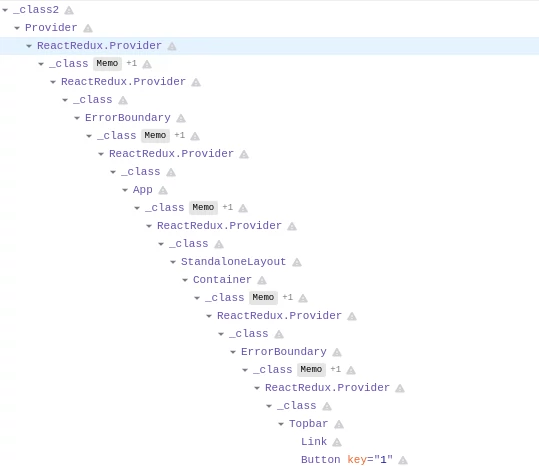
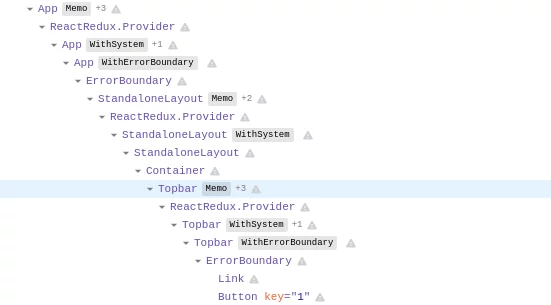
<p><code class="language-plaintext highlighter-rouge">view</code> plugin is no longer responsible for error handling logic. Rewriting the plugin had several
positive side effects like making the SwaggerUI rendering faster and simplifying the React component
tree in React developer tools:</p>

<figure class="figure d-block border">
  <img src="/assets/img/blog/swagger-ui-error-handling-rdtd-before.webp" width="539" height="466" class="figure-img rounded mx-auto d-block img-fluid" alt="todoList plugin" />
  <figcaption class="figure-caption text-center">Before refactor</figcaption>
</figure>

<figure class="figure d-block border">
  <img src="/assets/img/blog/swagger-ui-error-handling-rdtd-after.webp" width="551" height="305" class="figure-img rounded mx-auto d-block img-fluid" alt="todoList plugin" />
  <figcaption class="figure-caption text-center">After refactor</figcaption>
</figure>

<h2 id="safe-render-plugin">Safe-render plugin</h2>

<p>This plugin is solely responsible for error handling logic in SwaggerUI. Accepts a list of component
names that should be protected by error boundaries.</p>

<p>Its public API looks like this:</p>

<figure class="highlight"><pre><code class="language-js" data-lang="js"><table class="rouge-table"><tbody><tr><td class="gutter gl"><pre class="lineno">1
2
3
4
5
6
7
8
9
10
</pre></td><td class="code"><pre><span class="p">{</span>
  <span class="nl">fn</span><span class="p">:</span> <span class="p">{</span>
    <span class="nx">componentDidCatch</span><span class="p">,</span>
    <span class="na">withErrorBoundary</span><span class="p">:</span> <span class="nx">withErrorBoundary</span><span class="p">(</span><span class="nx">getSystem</span><span class="p">),</span>
  <span class="p">},</span>
  <span class="nx">components</span><span class="p">:</span> <span class="p">{</span>
    <span class="nx">ErrorBoundary</span><span class="p">,</span>
    <span class="nx">Fallback</span><span class="p">,</span>
  <span class="p">},</span>
<span class="p">}</span>
</pre></td></tr></tbody></table></code></pre></figure>

<p>safe-render plugin is automatically utilized by <a href="https://github.com/swagger-api/swagger-ui/blob/78f62c300a6d137e65fd027d850981b010009970/src/core/presets/base.js" target="_blank" rel="noopener noreferrer">base</a> and <a href="https://github.com/swagger-api/swagger-ui/tree/78f62c300a6d137e65fd027d850981b010009970/src/standalone" target="_blank" rel="noopener noreferrer">standalone</a> SwaggerUI presets and
should always be used as the last plugin, after all the components are already known to the SwaggerUI.
The plugin defines a default list of components that should be protected by error boundaries:</p>

<figure class="highlight"><pre><code class="language-js" data-lang="js"><span class="p">[</span>
  <span class="dl">"</span><span class="s2">App</span><span class="dl">"</span><span class="p">,</span>
  <span class="dl">"</span><span class="s2">BaseLayout</span><span class="dl">"</span><span class="p">,</span>
  <span class="dl">"</span><span class="s2">VersionPragmaFilter</span><span class="dl">"</span><span class="p">,</span>
  <span class="dl">"</span><span class="s2">InfoContainer</span><span class="dl">"</span><span class="p">,</span>
  <span class="dl">"</span><span class="s2">ServersContainer</span><span class="dl">"</span><span class="p">,</span>
  <span class="dl">"</span><span class="s2">SchemesContainer</span><span class="dl">"</span><span class="p">,</span>
  <span class="dl">"</span><span class="s2">AuthorizeBtnContainer</span><span class="dl">"</span><span class="p">,</span>
  <span class="dl">"</span><span class="s2">FilterContainer</span><span class="dl">"</span><span class="p">,</span>
  <span class="dl">"</span><span class="s2">Operations</span><span class="dl">"</span><span class="p">,</span>
  <span class="dl">"</span><span class="s2">OperationContainer</span><span class="dl">"</span><span class="p">,</span>
  <span class="dl">"</span><span class="s2">parameters</span><span class="dl">"</span><span class="p">,</span>
  <span class="dl">"</span><span class="s2">responses</span><span class="dl">"</span><span class="p">,</span>
  <span class="dl">"</span><span class="s2">OperationServers</span><span class="dl">"</span><span class="p">,</span>
  <span class="dl">"</span><span class="s2">Models</span><span class="dl">"</span><span class="p">,</span>
  <span class="dl">"</span><span class="s2">ModelWrapper</span><span class="dl">"</span><span class="p">,</span>
  <span class="dl">"</span><span class="s2">Topbar</span><span class="dl">"</span><span class="p">,</span>
  <span class="dl">"</span><span class="s2">StandaloneLayout</span><span class="dl">"</span><span class="p">,</span>
  <span class="dl">"</span><span class="s2">onlineValidatorBadge</span><span class="dl">"</span>
<span class="p">]</span></code></pre></figure>

<p>As demonstrated below, additional components can be protected by utilizing the safe-render plugin 
with configuration options. This gets really handy if you are a SwaggerUI integrator and you maintain a number of
plugins with additional custom components.</p>

<figure class="highlight"><pre><code class="language-js" data-lang="js"><table class="rouge-table"><tbody><tr><td class="gutter gl"><pre class="lineno">1
2
3
4
5
6
7
8
9
10
11
12
13
14
15
16
17
</pre></td><td class="code"><pre><span class="kd">const</span> <span class="nx">swaggerUI</span> <span class="o">=</span> <span class="nx">SwaggerUI</span><span class="p">({</span>
  <span class="na">url</span><span class="p">:</span> <span class="dl">"</span><span class="s2">https://petstore.swagger.io/v2/swagger.json</span><span class="dl">"</span><span class="p">,</span>
  <span class="na">dom_id</span><span class="p">:</span> <span class="dl">'</span><span class="s1">#swagger-ui</span><span class="dl">'</span><span class="p">,</span>
  <span class="na">plugins</span><span class="p">:</span> <span class="p">[</span>
    <span class="p">()</span> <span class="o">=&gt;</span> <span class="p">({</span>
      <span class="na">components</span><span class="p">:</span> <span class="p">{</span>
        <span class="na">MyCustomComponent1</span><span class="p">:</span> <span class="p">()</span> <span class="o">=&gt;</span> <span class="dl">'</span><span class="s1">my custom component</span><span class="dl">'</span><span class="p">,</span>
      <span class="p">},</span>
    <span class="p">}),</span>
    <span class="nx">SwaggerUI</span><span class="p">.</span><span class="nx">plugins</span><span class="p">.</span><span class="nx">SafeRender</span><span class="p">({</span>
      <span class="na">fullOverride</span><span class="p">:</span> <span class="kc">true</span><span class="p">,</span> <span class="c1">// only the component list defined here will apply (not the default list)</span>
      <span class="na">componentList</span><span class="p">:</span> <span class="p">[</span>
        <span class="dl">"</span><span class="s2">MyCustomComponent1</span><span class="dl">"</span><span class="p">,</span>
      <span class="p">],</span>
    <span class="p">}),</span>
  <span class="p">],</span>
<span class="p">});</span>
</pre></td></tr></tbody></table></code></pre></figure>

<h3 id="componentdidcatch">componentDidCatch</h3>

<p>This static function is invoked after a component has thrown an error.<br />
It receives two parameters:</p>

<ol>
  <li><code class="language-plaintext highlighter-rouge">error</code> - The error that was thrown.</li>
  <li><code class="language-plaintext highlighter-rouge">info</code> - An object with a componentStack key containing <a href="https://reactjs.org/docs/error-boundaries.html#component-stack-traces" target="_blank" rel="noopener noreferrer">information about which component threw the error</a>.</li>
</ol>

<p>It has precisely the same signature as error boundaries <a href="https://reactjs.org/docs/react-component.html#componentdidcatch" target="_blank" rel="noopener noreferrer">componentDidCatch lifecycle method</a>,
except it’s a static function and not a class method.</p>

<p>Default implement of componentDidCatch uses <code class="language-plaintext highlighter-rouge">console.error</code> to display the received error:</p>

<figure class="highlight"><pre><code class="language-js" data-lang="js"><span class="k">export</span> <span class="kd">const</span> <span class="nx">componentDidCatch</span> <span class="o">=</span> <span class="nx">console</span><span class="p">.</span><span class="nx">error</span><span class="p">;</span></code></pre></figure>

<p>To utilize your own error handling logic (e.g. <a href="https://www.bugsnag.com/" target="_blank" rel="noopener noreferrer">bugsnag</a>), create new SwaggerUI plugin that overrides componentDidCatch:</p>

<figure class="highlight"><pre><code class="language-js" data-lang="js"><table class="rouge-table"><tbody><tr><td class="gutter gl"><pre class="lineno">1
2
3
4
5
6
7
8
9
10
11
12
</pre></td><td class="code"><pre><span class="kd">const</span> <span class="nx">BugsnagErrorHandlerPlugin</span> <span class="o">=</span> <span class="p">()</span> <span class="o">=&gt;</span> <span class="p">{</span>
  <span class="c1">// init bugsnag</span>

  <span class="k">return</span> <span class="p">{</span>
    <span class="na">fn</span><span class="p">:</span> <span class="p">{</span>
      <span class="nx">componentDidCatch</span> <span class="o">=</span> <span class="p">(</span><span class="nx">error</span><span class="p">,</span> <span class="nx">info</span><span class="p">)</span> <span class="o">=&gt;</span> <span class="p">{</span>
        <span class="nx">Bugsnag</span><span class="p">.</span><span class="nx">notify</span><span class="p">(</span><span class="nx">error</span><span class="p">);</span>
        <span class="nx">Bugsnag</span><span class="p">.</span><span class="nx">notify</span><span class="p">(</span><span class="nx">info</span><span class="p">);</span>
      <span class="p">},</span>
    <span class="p">},</span>
  <span class="p">};</span>
<span class="p">};</span>
</pre></td></tr></tbody></table></code></pre></figure>

<h3 id="witherrorboundary">withErrorBoundary</h3>

<p>This function is HOC (Higher Order Component). It wraps a particular component into the <code class="language-plaintext highlighter-rouge">ErrorBoundary</code> component.
It can be overridden via a plugin system to control how components are wrapped by the ErrorBoundary component.
In 99.9% of situations, you won’t need to override this function, but if you do, please read the source code of this function first.</p>

<h3 id="fallback">Fallback</h3>

<p>The component is displayed when the error boundary catches an error. It can be overridden via a plugin system.
Its default implementation is trivial:</p>

<figure class="highlight"><pre><code class="language-js" data-lang="js"><table class="rouge-table"><tbody><tr><td class="gutter gl"><pre class="lineno">1
2
3
4
5
6
7
8
9
10
11
12
</pre></td><td class="code"><pre><span class="k">import</span> <span class="nx">React</span> <span class="k">from</span> <span class="dl">"</span><span class="s2">react</span><span class="dl">"</span>
<span class="k">import</span> <span class="nx">PropTypes</span> <span class="k">from</span> <span class="dl">"</span><span class="s2">prop-types</span><span class="dl">"</span>

<span class="kd">const</span> <span class="nx">Fallback</span> <span class="o">=</span> <span class="p">({</span> <span class="nx">name</span> <span class="p">})</span> <span class="o">=&gt;</span> <span class="p">(</span>
  <span class="o">&lt;</span><span class="nx">div</span> <span class="nx">className</span><span class="o">=</span><span class="dl">"</span><span class="s2">fallback</span><span class="dl">"</span><span class="o">&gt;</span>
    <span class="err">😱</span> <span class="o">&lt;</span><span class="nx">i</span><span class="o">&gt;</span><span class="nx">Could</span> <span class="nx">not</span> <span class="nx">render</span> <span class="p">{</span> <span class="nx">name</span> <span class="o">===</span> <span class="dl">"</span><span class="s2">t</span><span class="dl">"</span> <span class="p">?</span> <span class="dl">"</span><span class="s2">this component</span><span class="dl">"</span> <span class="p">:</span> <span class="nx">name</span> <span class="p">},</span> <span class="nx">see</span> <span class="nx">the</span> <span class="nx">console</span><span class="p">.</span><span class="o">&lt;</span><span class="sr">/i</span><span class="err">&gt;
</span>  <span class="o">&lt;</span><span class="sr">/div</span><span class="err">&gt;
</span><span class="p">)</span>
<span class="nx">Fallback</span><span class="p">.</span><span class="nx">propTypes</span> <span class="o">=</span> <span class="p">{</span>
  <span class="na">name</span><span class="p">:</span> <span class="nx">PropTypes</span><span class="p">.</span><span class="nx">string</span><span class="p">.</span><span class="nx">isRequired</span><span class="p">,</span>
<span class="p">}</span>
<span class="k">export</span> <span class="k">default</span> <span class="nx">Fallback</span>
</pre></td></tr></tbody></table></code></pre></figure>

<p>Feel free to override it to match your look &amp; feel:</p>

<figure class="highlight"><pre><code class="language-js" data-lang="js"><table class="rouge-table"><tbody><tr><td class="gutter gl"><pre class="lineno">1
2
3
4
5
6
7
8
9
10
11
12
13
</pre></td><td class="code"><pre><span class="kd">const</span> <span class="nx">CustomFallbackPlugin</span> <span class="o">=</span> <span class="p">()</span> <span class="o">=&gt;</span> <span class="p">({</span>
  <span class="na">components</span><span class="p">:</span> <span class="p">{</span>
    <span class="na">Fallback</span><span class="p">:</span> <span class="p">({</span> <span class="nx">name</span> <span class="p">}</span> <span class="p">)</span> <span class="o">=&gt;</span> <span class="s2">`This is my custom fallback. </span><span class="p">${</span><span class="nx">name</span><span class="p">}</span><span class="s2"> failed to render`</span><span class="p">,</span>
  <span class="p">},</span>
<span class="p">});</span>

<span class="kd">const</span> <span class="nx">swaggerUI</span> <span class="o">=</span> <span class="nx">SwaggerUI</span><span class="p">({</span>
  <span class="na">url</span><span class="p">:</span> <span class="dl">"</span><span class="s2">https://petstore.swagger.io/v2/swagger.json</span><span class="dl">"</span><span class="p">,</span>
  <span class="na">dom_id</span><span class="p">:</span> <span class="dl">'</span><span class="s1">#swagger-ui</span><span class="dl">'</span><span class="p">,</span>
  <span class="na">plugins</span><span class="p">:</span> <span class="p">[</span>
    <span class="nx">CustomFallbackPlugin</span><span class="p">,</span>
  <span class="p">]</span>  
<span class="p">});</span>
</pre></td></tr></tbody></table></code></pre></figure>

<h3 id="errorboundary">ErrorBoundary</h3>

<p>This is the component that implements React error boundaries. Uses <code class="language-plaintext highlighter-rouge">componentDidCatch</code> and <code class="language-plaintext highlighter-rouge">Fallback</code>
under the hood. In 99.9% of situations, you won’t need to override this component, but if you do, 
please read the source code of this component first.</p>

<h2 id="change-in-behavior">Change in behavior</h2>

<p>In prior releases of SwaggerUI, almost all components have been protected, and when thrown error,
<code class="language-plaintext highlighter-rouge">Fallback</code> component was displayed. This changes with SwaggerUI v4.3.0. Only components defined
by the <code class="language-plaintext highlighter-rouge">safe-render</code> plugin are now protected and display fallback. If a small component somewhere within
SwaggerUI React component tree fails to render and throws an error, the error bubbles up to the closest
error boundary, and that error boundary displays the <code class="language-plaintext highlighter-rouge">Fallback</code> component and invokes <code class="language-plaintext highlighter-rouge">componentDidCatch</code>.</p>

<p>If you’re interested in more technical details, here is the <a href="https://github.com/swagger-api/swagger-ui/pull/7761/files" target="_blank" rel="noopener noreferrer">PR</a>
that introduced the new error handling into SwaggerUI.</p>]]></content><author><name>Vladimír Gorej</name></author><summary type="html"><![CDATA[Error handling is an essential aspect of today's modern Single Page Applications. Error handling refers to the anticipation, detection, and resolution of different kinds of errors. As of version v4.3.0, SwaggerUIs error handling capabilities have considerably improved and allowed SwaggerUI integrators to easily integrate their custom errors handlers.]]></summary><media:thumbnail xmlns:media="http://search.yahoo.com/mrss/" url="https://vladimirgorej.com/assets/img/blog/swagger-ui-error-handling.webp" /><media:content medium="image" url="https://vladimirgorej.com/assets/img/blog/swagger-ui-error-handling.webp" xmlns:media="http://search.yahoo.com/mrss/" /></entry><entry><title type="html">How to migrate from querystring to URLSearchParams in Node.js</title><link href="https://vladimirgorej.com/blog/how-to-migrate-from-querystring-to-url-search-params-in-nodejs/" rel="alternate" type="text/html" title="How to migrate from querystring to URLSearchParams in Node.js" /><published>2021-10-14T07:00:00+00:00</published><updated>2021-10-14T07:00:00+00:00</updated><id>https://vladimirgorej.com/blog/how-to-migrate-from-querystring-to-url-search-params-in-nodejs</id><content type="html" xml:base="https://vladimirgorej.com/blog/how-to-migrate-from-querystring-to-url-search-params-in-nodejs/"><![CDATA[<p class="lead">
  Node.js marked the <a href="https://nodejs.org/docs/latest-v16.x/api/querystring.html" target="_blank" rel="noopener noreferrer">querystring</a> as legacy API in version 14.x,
  and recommends using <a href="https://nodejs.org/docs/latest-v16.x/api/url.html#url_class_urlsearchparams" target="_blank" rel="noopener noreferrer">URLSearchParams</a>. 
  But doesn't give us any clue how to actually migrate. This article fills this void and provides a migration guide.
</p>

<h2 id="querystring">querystring</h2>

<p><em>querystring</em> API is quite simple and straightforward:</p>

<dl class="row">
  <dt class="col-sm-3">querystring.parse()</dt>
  <dd class="col-sm-9">Parses a URL query string into a collection of key and value pairs. <span class="text-muted">querystring.decode()</span> is an alias.</dd>

  <dt class="col-sm-3">querystring.stringify()</dt>
  <dd class="col-sm-9">Produces a URL query string from a given obj by iterating through the object's "own properties". <span class="text-muted">querystring.encode()</span> is an alias.</dd>

  <dt class="col-sm-3">querystring.escape()</dt>
  <dd class="col-sm-9">Performs URL percent-encoding on the given string in a manner that is optimized for the specific requirements of URL query strings. Is used by <span class="text-muted">querystring.stringify()</span>.</dd>

  <dt class="col-sm-3">querystring.unescape()</dt>
  <dd class="col-sm-9">Performs decoding of URL percent-encoded characters on the given string. Is used by <span class="text-muted">querystring.parse().</span></dd>
</dl>

<h3 id="parse-a-url-query-string">Parse a URL query string</h3>

<figure class="highlight"><pre><code class="language-javascript" data-lang="javascript"><span class="kd">const</span> <span class="p">{</span> <span class="nx">parse</span> <span class="p">}</span> <span class="o">=</span> <span class="nx">require</span><span class="p">(</span><span class="dl">'</span><span class="s1">querystring</span><span class="dl">'</span><span class="p">);</span>

<span class="nx">parse</span><span class="p">(</span><span class="dl">'</span><span class="s1">foo=bar&amp;abc=xyz&amp;abc=123</span><span class="dl">'</span><span class="p">);</span>

<span class="c1">// returns</span>
<span class="c1">// { </span>
<span class="c1">//   foo: 'bar',</span>
<span class="c1">//   abc: ['xyz', '123']</span>
<span class="c1">// }</span></code></pre></figure>

<h3 id="produce-a-url-query-string">Produce a URL query string</h3>

<figure class="highlight"><pre><code class="language-javascript" data-lang="javascript"><span class="kd">const</span> <span class="p">{</span> <span class="nx">stringify</span> <span class="p">}</span> <span class="o">=</span> <span class="nx">require</span><span class="p">(</span><span class="dl">'</span><span class="s1">querystring</span><span class="dl">'</span><span class="p">);</span>

<span class="nx">stringify</span><span class="p">({</span> <span class="na">foo</span><span class="p">:</span> <span class="dl">'</span><span class="s1">bar</span><span class="dl">'</span><span class="p">,</span> <span class="na">baz</span><span class="p">:</span> <span class="p">[</span><span class="dl">'</span><span class="s1">qux</span><span class="dl">'</span><span class="p">,</span> <span class="dl">'</span><span class="s1">quux</span><span class="dl">'</span><span class="p">],</span> <span class="na">corge</span><span class="p">:</span> <span class="dl">''</span> <span class="p">});</span>

<span class="c1">// returns 'foo=bar&amp;baz=qux&amp;baz=quux&amp;corge='</span></code></pre></figure>

<h3 id="perform-url-percent-encoding-on-the-given-string">Perform URL percent-encoding on the given string</h3>

<figure class="highlight"><pre><code class="language-javascript" data-lang="javascript"><span class="kd">const</span> <span class="p">{</span> <span class="nx">escape</span> <span class="p">}</span> <span class="o">=</span> <span class="nx">require</span><span class="p">(</span><span class="dl">'</span><span class="s1">querystring</span><span class="dl">'</span><span class="p">);</span>

<span class="nx">escape</span><span class="p">(</span><span class="dl">'</span><span class="s1">str1 str2</span><span class="dl">'</span><span class="p">);</span>

<span class="c1">// returns 'str1%20str2'</span></code></pre></figure>

<h3 id="perform-decoding-of-url-percent-encoded-characters-on-the-given-string">Perform decoding of URL percent-encoded characters on the given string</h3>

<figure class="highlight"><pre><code class="language-javascript" data-lang="javascript"><span class="kd">const</span> <span class="p">{</span> <span class="nx">unescape</span> <span class="p">}</span> <span class="o">=</span> <span class="nx">require</span><span class="p">(</span><span class="dl">'</span><span class="s1">querystring</span><span class="dl">'</span><span class="p">);</span>

<span class="nx">escape</span><span class="p">(</span><span class="dl">'</span><span class="s1">str1%20str2</span><span class="dl">'</span><span class="p">);</span>

<span class="c1">// returns 'str1 str2'</span></code></pre></figure>

<h2 id="urlsearchparams">URLSearchParams</h2>

<p>What’s the actual difference between <code class="language-plaintext highlighter-rouge">querystring</code> vs. <code class="language-plaintext highlighter-rouge">URLSearchParams</code>?</p>

<blockquote class="blockquote">
  <p>"The WHATWG <em>URLSearchParams</em> interface and the <em>querystring</em> module have similar purpose, but the purpose of the <em>querystring</em> module is more general, as it allows the customization of delimiter characters."</p>
  <footer class="blockquote-footer"><cite title="Node.js 14.x documentation">Node.js 14.x documentation</cite></footer>
</blockquote>

<p>Working with URIs/URLs in JavaScript was always confusing. <a href="https://url.spec.whatwg.org/" target="_blank" rel="noopener noreferrer">WHATWG URL specification</a> finally
standardizes the term URL and provides a standardized way how we work with URLs. <em>URLSearchParams</em> is part of this specification.
Now let’s migrate our previous <em>querystring</em> examples to <em>URLSearchParams</em> API.</p>

<h3 id="parse-a-url-query-string-1">Parse a URL query string</h3>

<figure class="highlight"><pre><code class="language-javascript" data-lang="javascript"><span class="kd">const</span> <span class="nx">params</span> <span class="o">=</span> <span class="k">new</span> <span class="nx">URLSearchParams</span><span class="p">(</span><span class="dl">'</span><span class="s1">foo=bar&amp;abc=xyz&amp;abc=123</span><span class="dl">'</span><span class="p">);</span>
<span class="c1">// URLSearchParams { 'foo' =&gt; 'bar', 'abc' =&gt; 'xyz', 'abc' =&gt; '123' }</span>

<span class="nx">params</span><span class="p">.</span><span class="kd">get</span><span class="p">(</span><span class="dl">'</span><span class="s1">foo</span><span class="dl">'</span><span class="p">);</span> <span class="c1">// 'bar'</span>
<span class="nx">params</span><span class="p">.</span><span class="nx">getAll</span><span class="p">(</span><span class="dl">'</span><span class="s1">abc</span><span class="dl">'</span><span class="p">)</span> <span class="c1">// ['xyz', '123']</span></code></pre></figure>

<h3 id="produce-a-url-query-string-1">Produce a URL query string</h3>

<figure class="highlight"><pre><code class="language-javascript" data-lang="javascript"><span class="k">new</span> <span class="nx">URLSearchParams</span><span class="p">({</span> <span class="na">foo</span><span class="p">:</span> <span class="dl">'</span><span class="s1">bar</span><span class="dl">'</span><span class="p">,</span> <span class="na">baz</span><span class="p">:</span> <span class="p">[</span><span class="dl">'</span><span class="s1">qux</span><span class="dl">'</span><span class="p">,</span> <span class="dl">'</span><span class="s1">quux</span><span class="dl">'</span><span class="p">],</span> <span class="na">corge</span><span class="p">:</span> <span class="dl">''</span> <span class="p">}).</span><span class="nx">toString</span><span class="p">();</span>
<span class="c1">// returns 'foo=bar&amp;baz=qux%2Cquux&amp;corge='</span></code></pre></figure>

<p>As we can see, what we got is a different result compared to <em>querystring</em>.</p>

<div class="table-responsive">
  <table class="table">
    <thead>
      <tr>
        <th scope="col">API</th>
        <th scope="col">Result</th>
      </tr>
    </thead>
    <tbody>
      <tr>
        <td>querystring</td>
        <td>foo=bar&amp;baz=qux&amp;baz=quux&amp;corge=</td>
      </tr>
      <tr>
        <td>URLSearchParams</td>
        <td>foo=bar&amp;baz=qux%2Cquux&amp;corge=</td>
      </tr>
    </tbody>
  </table>
</div>

<blockquote class="blockquote">
  <p>"Unlike <em>querystring</em> module, duplicate keys in the form of array values are not allowed. Arrays are stringified using array.toString(), which simply joins all array elements with commas."</p>
  <footer class="blockquote-footer"><cite title="Node.js 14.x documentation">Node.js 14.x documentation</cite></footer>
</blockquote>

<p>To get the result compatible with <em>querystring</em>, we have to initialize <em>URLSearchParams</em> with a list of tuples 
instead of object:</p>

<figure class="highlight"><pre><code class="language-javascript" data-lang="javascript"><span class="k">new</span> <span class="nx">URLSearchParams</span><span class="p">([</span>
  <span class="p">[</span><span class="dl">'</span><span class="s1">foo</span><span class="dl">'</span><span class="p">,</span> <span class="dl">'</span><span class="s1">bar</span><span class="dl">'</span><span class="p">],</span>
  <span class="p">[</span><span class="dl">'</span><span class="s1">baz</span><span class="dl">'</span><span class="p">,</span> <span class="dl">'</span><span class="s1">qux</span><span class="dl">'</span><span class="p">],</span>
  <span class="p">[</span><span class="dl">'</span><span class="s1">baz</span><span class="dl">'</span><span class="p">,</span> <span class="dl">'</span><span class="s1">quux</span><span class="dl">'</span><span class="p">],</span>
  <span class="p">[</span><span class="dl">'</span><span class="s1">corge</span><span class="dl">'</span><span class="p">,</span> <span class="dl">''</span><span class="p">],</span>
<span class="p">]).</span><span class="nx">toString</span><span class="p">();</span>
<span class="c1">// returns 'foo=bar&amp;baz=qux&amp;baz=quux&amp;corge='</span></code></pre></figure>

<h3 id="perform-url-percent-encoding-on-the-given-string-1">Perform URL percent-encoding on the given string</h3>

<p>There is no low-level API for encoding simple strings in <em>URLSearchParams</em>.
We have to be a little creative to achieve URL encoding. Below
are 2 different yet functionally equivalent ways how to achieve the same result.</p>

<figure class="highlight"><pre><code class="language-javascript" data-lang="javascript"><span class="k">new</span> <span class="nx">URLSearchParams</span><span class="p">([[</span><span class="dl">''</span><span class="p">,</span> <span class="dl">'</span><span class="s1">str1 str2</span><span class="dl">'</span><span class="p">]]).</span><span class="nx">toString</span><span class="p">().</span><span class="nx">slice</span><span class="p">(</span><span class="mi">1</span><span class="p">);</span>
<span class="k">new</span> <span class="nx">URLSearchParams</span><span class="p">({</span><span class="dl">''</span><span class="p">:</span> <span class="dl">'</span><span class="s1">str1 str2</span><span class="dl">'</span><span class="p">}).</span><span class="nx">toString</span><span class="p">().</span><span class="nx">slice</span><span class="p">(</span><span class="mi">1</span><span class="p">);</span>
<span class="c1">// returns 'str1+str2'</span></code></pre></figure>

<p>Again, we can see what we got is a different result compared to <em>querystring</em>. WHATWG URL specification
is now precise about how various segments of URL gets encoded. Spaces in query parameters are now plus-sign (<code class="language-plaintext highlighter-rouge">+</code>) encoded, 
compared to percent-encoded spaces in the path segment of the URL. This currently accepted behavior is <strong>backward incompatible</strong> with <em>querystring</em>,
and there is nothing you can do about it except to take it.</p>

<table class="table">
  <thead>
    <tr>
      <th scope="col">API</th>
      <th scope="col">Result</th>
    </tr>
  </thead>
  <tbody>
    <tr>
      <td>querystring</td>
      <td>str1%20str2</td>
    </tr>
    <tr>
      <td>URLSearchParams</td>
      <td>str1+str2</td>
    </tr>
  </tbody>
</table>

<h3 id="perform-decoding-of-url-percent-encoded-characters-on-the-given-string-1">Perform decoding of URL percent-encoded characters on the given string</h3>

<p>There is no low-level API for decoding a simple string in <em>URLSearchParams</em>.
Again we have to be creative to achieve URL decoding on the given string.</p>

<figure class="highlight"><pre><code class="language-javascript" data-lang="javascript"><span class="kd">const</span> <span class="nx">urlPlusEncodedString</span> <span class="o">=</span> <span class="dl">'</span><span class="s1">str1+str2</span><span class="dl">'</span><span class="p">;</span>

<span class="k">new</span> <span class="nx">URLSearchParams</span><span class="p">(</span><span class="s2">`=</span><span class="p">${</span><span class="nx">urlPlusEncodedString</span><span class="p">}</span><span class="s2">`</span><span class="p">).</span><span class="kd">get</span><span class="p">(</span><span class="dl">''</span><span class="p">);</span>
<span class="c1">// returns 'str1 str2'</span></code></pre></figure>

<p>URLSearchParams will handle percent-encoded spaces as well:</p>

<figure class="highlight"><pre><code class="language-javascript" data-lang="javascript"><span class="kd">const</span> <span class="nx">urlPercentEncodedString</span> <span class="o">=</span> <span class="dl">'</span><span class="s1">str1%20str2</span><span class="dl">'</span><span class="p">;</span>

<span class="k">new</span> <span class="nx">URLSearchParams</span><span class="p">(</span><span class="s2">`=</span><span class="p">${</span><span class="nx">urlPercentEncodedString</span><span class="p">}</span><span class="s2">`</span><span class="p">).</span><span class="kd">get</span><span class="p">(</span><span class="dl">''</span><span class="p">);</span>
<span class="c1">// returns 'str1 str2'</span></code></pre></figure>

<h2 id="other-differences">Other differences</h2>

<p><strong>Handling of question mark character</strong></p>

<p><em>URLSearchParams</em> removes question mark character from the start of the URL query string. <em>querystring</em>
keeps it and makes it part of the key name.</p>

<figure class="highlight"><pre><code class="language-javascript" data-lang="javascript"><span class="kd">const</span> <span class="p">{</span> <span class="nx">parse</span> <span class="p">}</span> <span class="o">=</span> <span class="nx">require</span><span class="p">(</span><span class="dl">'</span><span class="s1">querystring</span><span class="dl">'</span><span class="p">);</span>

<span class="nx">parse</span><span class="p">(</span><span class="dl">'</span><span class="s1">?foo=bar</span><span class="dl">'</span><span class="p">);</span> <span class="c1">// returns { '?foo': 'bar' }</span>
<span class="k">new</span> <span class="nx">URLSearchParams</span><span class="p">(</span><span class="dl">'</span><span class="s1">?foo=bar</span><span class="dl">'</span><span class="p">);</span> <span class="c1">// returns URLSearchParams { 'foo' =&gt; 'bar' }</span></code></pre></figure>

<p><strong>Converting URLSearchParams object to Plain JavaScript Object</strong></p>

<p><em>URLSearchParams</em> object is a class instance. It is not a classical Plain JavaScript Object (POJO).
To transform URLSearchParam instance into a POJO, use the following recipe.</p>

<figure class="highlight"><pre><code class="language-javascript" data-lang="javascript"><span class="kd">const</span> <span class="nx">params</span> <span class="o">=</span> <span class="k">new</span> <span class="nx">URLSearchParams</span><span class="p">(</span><span class="dl">'</span><span class="s1">foo=bar</span><span class="dl">'</span><span class="p">);</span>
<span class="kd">const</span> <span class="nx">paramsPOJO</span> <span class="o">=</span> <span class="nb">Object</span><span class="p">.</span><span class="nx">fromEntries</span><span class="p">(</span><span class="nx">params</span><span class="p">.</span><span class="nx">entries</span><span class="p">());</span> <span class="c1">// { 'foo': 'bar' }</span></code></pre></figure>

<p><em>Have you found other differences? I’d be happy to add them to this list.</em></p>

<h2 id="closing-words">Closing words</h2>

<p><em>querystring</em> is a legacy Node.js API that shouldn’t be used anymore. New code should only
use <em>URLSearchParams</em>, which is part of <strong>WHATWG URL specification</strong>. Old code using <em>querystring</em>
can easily be migrated to <em>URLSearchParams</em> using this guide. The only <strong>backward incompatibility</strong>
between the two APIs is that <em>URLSearchParams</em> use plus-encoded spaces instead of percent-encoded
spaces in <em>querystring</em>.</p>]]></content><author><name>Vladimír Gorej</name></author><summary type="html"><![CDATA[Node.js marked the querystring as legacy API and recommends using URLSearchParams. But doesn't give us any clue how to actually migrate. This article fills this void and provides a migration guide.]]></summary><media:thumbnail xmlns:media="http://search.yahoo.com/mrss/" url="https://vladimirgorej.com/assets/img/blog/querystring-migration.webp" /><media:content medium="image" url="https://vladimirgorej.com/assets/img/blog/querystring-migration.webp" xmlns:media="http://search.yahoo.com/mrss/" /></entry><entry><title type="html">How to apply the Apache 2.0 License to your Open Source software project</title><link href="https://vladimirgorej.com/blog/how-to-apply-apache2-license-to-your-open-source-software-project/" rel="alternate" type="text/html" title="How to apply the Apache 2.0 License to your Open Source software project" /><published>2021-10-02T12:15:00+00:00</published><updated>2021-10-02T12:15:00+00:00</updated><id>https://vladimirgorej.com/blog/how-to-apply-apache2-license-to-your-open-source-software-project</id><content type="html" xml:base="https://vladimirgorej.com/blog/how-to-apply-apache2-license-to-your-open-source-software-project/"><![CDATA[<p class="lead">
Apache 2.0 License is one of the best OSS licenses to use in your Open Source software project, but do you actually know how to properly apply it? We'll go through all the common mistakes and show how to use the license correctly.
</p>

<p>I’ve always been a <span class="fst-italic">3-Clause BSD License</span> (AKA <i>New BSD License</i> or <span class="fst-italic">Modified BSD License</span>) guy.
As I’ve matured, my understanding of Open Source licensing has grown as well, and so have my requirements. When I start a new Open Source
project now, I just use <strong>Apache 2.0 license</strong>. I want to point out that I am not a lawyer, and I am certainly not your lawyer.
My legal opinions are based on research and lengthy conversations with legal departments of companies that I worked for.</p>

<h2 id="why-apache-20-license">Why Apache 2.0 license?</h2>

<p>There are various reasons why I prefer Apache 2.0 license over the others (specifically the 3-Clause BSD License).
This <a href="https://www.whitesourcesoftware.com/resources/blog/top-10-apache-license-questions-answered/#7_What_is_the_difference_between_Apache_License_20_and_BSD" target="_blank" rel="noopener noreferrer">WhiteSource article</a>
covers the differences nicely, but for completeness, let me mentioned them here explicitly as well:</p>

<dl class="row">
  <dt class="col-sm-3">Explicit grant of patent rights</dt>
  <dd class="col-sm-9">Apache License 2.0 explicitly lays down the grant of patent rights while using, modifying, or distributing Apache licensed software; it also lists the circumstances when such grant gets withdrawn.</dd>

  <dt class="col-sm-3">Precise definitions of the used concepts</dt>
  <dd class="col-sm-9">Apache License 2.0 explicitly defines all the terms and concepts that it uses. This leaves little scope for ambiguity.</dd> 

  <dt class="col-sm-3">Reusable without rewording</dt>
  <dd class="col-sm-9">
    Apache License 2.0 can be easily used by other projects without any rewording in the license document itself.
    It also means that it should be sufficient to provide the canonical URL <code>https://www.apache.org/licenses/LICENSE-2.0.txt</code>, where
    the copy of the license can be obtained, instead of the license text.
  </dd>
</dl>

<p>These differences are most important to me, but other differences like <em>“prominent notices stating that You changed the files”</em>
might be more critical for you. Here is the full text of the Apache 2.0 license:</p>

<figure class="highlight"><pre><code class="language-text" data-lang="text"><table class="rouge-table"><tbody><tr><td class="gutter gl"><pre class="lineno">1
2
3
4
5
6
7
8
9
10
11
12
13
14
15
16
17
18
19
20
21
22
23
24
25
26
27
28
29
30
31
32
33
34
35
36
37
38
39
40
41
42
43
44
45
46
47
48
49
50
51
52
53
54
55
56
57
58
59
60
61
62
63
64
65
66
67
68
69
70
71
72
73
74
75
76
77
78
79
80
81
82
83
84
85
86
87
88
89
90
91
92
93
94
95
96
97
98
99
100
101
102
103
104
105
106
107
108
109
110
111
112
113
114
115
116
117
118
119
120
121
122
123
124
125
126
127
128
129
130
131
132
133
134
135
136
137
138
139
140
141
142
143
144
145
146
147
148
149
150
151
152
153
154
155
156
157
158
159
160
161
162
163
164
165
166
167
168
169
170
171
172
173
174
175
176
177
178
179
180
181
182
183
184
185
186
187
188
189
190
191
192
193
194
195
196
197
198
199
200
201
</pre></td><td class="code"><pre>                                Apache License
                           Version 2.0, January 2004
                        http://www.apache.org/licenses/

TERMS AND CONDITIONS FOR USE, REPRODUCTION, AND DISTRIBUTION

1. Definitions.

   "License" shall mean the terms and conditions for use, reproduction,
   and distribution as defined by Sections 1 through 9 of this document.

   "Licensor" shall mean the copyright owner or entity authorized by
   the copyright owner that is granting the License.

   "Legal Entity" shall mean the union of the acting entity and all
   other entities that control, are controlled by, or are under common
   control with that entity. For the purposes of this definition,
   "control" means (i) the power, direct or indirect, to cause the
   direction or management of such entity, whether by contract or
   otherwise, or (ii) ownership of fifty percent (50%) or more of the
   outstanding shares, or (iii) beneficial ownership of such entity.

   "You" (or "Your") shall mean an individual or Legal Entity
   exercising permissions granted by this License.

   "Source" form shall mean the preferred form for making modifications,
   including but not limited to software source code, documentation
   source, and configuration files.

   "Object" form shall mean any form resulting from mechanical
   transformation or translation of a Source form, including but
   not limited to compiled object code, generated documentation,
   and conversions to other media types.

   "Work" shall mean the work of authorship, whether in Source or
   Object form, made available under the License, as indicated by a
   copyright notice that is included in or attached to the work
   (an example is provided in the Appendix below).

   "Derivative Works" shall mean any work, whether in Source or Object
   form, that is based on (or derived from) the Work and for which the
   editorial revisions, annotations, elaborations, or other modifications
   represent, as a whole, an original work of authorship. For the purposes
   of this License, Derivative Works shall not include works that remain
   separable from, or merely link (or bind by name) to the interfaces of,
   the Work and Derivative Works thereof.

   "Contribution" shall mean any work of authorship, including
   the original version of the Work and any modifications or additions
   to that Work or Derivative Works thereof, that is intentionally
   submitted to Licensor for inclusion in the Work by the copyright owner
   or by an individual or Legal Entity authorized to submit on behalf of
   the copyright owner. For the purposes of this definition, "submitted"
   means any form of electronic, verbal, or written communication sent
   to the Licensor or its representatives, including but not limited to
   communication on electronic mailing lists, source code control systems,
   and issue tracking systems that are managed by, or on behalf of, the
   Licensor for the purpose of discussing and improving the Work, but
   excluding communication that is conspicuously marked or otherwise
   designated in writing by the copyright owner as "Not a Contribution."

   "Contributor" shall mean Licensor and any individual or Legal Entity
   on behalf of whom a Contribution has been received by Licensor and
   subsequently incorporated within the Work.

2. Grant of Copyright License. Subject to the terms and conditions of
   this License, each Contributor hereby grants to You a perpetual,
   worldwide, non-exclusive, no-charge, royalty-free, irrevocable
   copyright license to reproduce, prepare Derivative Works of,
   publicly display, publicly perform, sublicense, and distribute the
   Work and such Derivative Works in Source or Object form.

3. Grant of Patent License. Subject to the terms and conditions of
   this License, each Contributor hereby grants to You a perpetual,
   worldwide, non-exclusive, no-charge, royalty-free, irrevocable
   (except as stated in this section) patent license to make, have made,
   use, offer to sell, sell, import, and otherwise transfer the Work,
   where such license applies only to those patent claims licensable
   by such Contributor that are necessarily infringed by their
   Contribution(s) alone or by combination of their Contribution(s)
   with the Work to which such Contribution(s) was submitted. If You
   institute patent litigation against any entity (including a
   cross-claim or counterclaim in a lawsuit) alleging that the Work
   or a Contribution incorporated within the Work constitutes direct
   or contributory patent infringement, then any patent licenses
   granted to You under this License for that Work shall terminate
   as of the date such litigation is filed.

4. Redistribution. You may reproduce and distribute copies of the
   Work or Derivative Works thereof in any medium, with or without
   modifications, and in Source or Object form, provided that You
   meet the following conditions:

   (a) You must give any other recipients of the Work or
   Derivative Works a copy of this License; and

   (b) You must cause any modified files to carry prominent notices
   stating that You changed the files; and

   (c) You must retain, in the Source form of any Derivative Works
   that You distribute, all copyright, patent, trademark, and
   attribution notices from the Source form of the Work,
   excluding those notices that do not pertain to any part of
   the Derivative Works; and

   (d) If the Work includes a "NOTICE" text file as part of its
   distribution, then any Derivative Works that You distribute must
   include a readable copy of the attribution notices contained
   within such NOTICE file, excluding those notices that do not
   pertain to any part of the Derivative Works, in at least one
   of the following places: within a NOTICE text file distributed
   as part of the Derivative Works; within the Source form or
   documentation, if provided along with the Derivative Works; or,
   within a display generated by the Derivative Works, if and
   wherever such third-party notices normally appear. The contents
   of the NOTICE file are for informational purposes only and
   do not modify the License. You may add Your own attribution
   notices within Derivative Works that You distribute, alongside
   or as an addendum to the NOTICE text from the Work, provided
   that such additional attribution notices cannot be construed
   as modifying the License.

   You may add Your own copyright statement to Your modifications and
   may provide additional or different license terms and conditions
   for use, reproduction, or distribution of Your modifications, or
   for any such Derivative Works as a whole, provided Your use,
   reproduction, and distribution of the Work otherwise complies with
   the conditions stated in this License.

5. Submission of Contributions. Unless You explicitly state otherwise,
   any Contribution intentionally submitted for inclusion in the Work
   by You to the Licensor shall be under the terms and conditions of
   this License, without any additional terms or conditions.
   Notwithstanding the above, nothing herein shall supersede or modify
   the terms of any separate license agreement you may have executed
   with Licensor regarding such Contributions.

6. Trademarks. This License does not grant permission to use the trade
   names, trademarks, service marks, or product names of the Licensor,
   except as required for reasonable and customary use in describing the
   origin of the Work and reproducing the content of the NOTICE file.

7. Disclaimer of Warranty. Unless required by applicable law or
   agreed to in writing, Licensor provides the Work (and each
   Contributor provides its Contributions) on an "AS IS" BASIS,
   WITHOUT WARRANTIES OR CONDITIONS OF ANY KIND, either express or
   implied, including, without limitation, any warranties or conditions
   of TITLE, NON-INFRINGEMENT, MERCHANTABILITY, or FITNESS FOR A
   PARTICULAR PURPOSE. You are solely responsible for determining the
   appropriateness of using or redistributing the Work and assume any
   risks associated with Your exercise of permissions under this License.

8. Limitation of Liability. In no event and under no legal theory,
   whether in tort (including negligence), contract, or otherwise,
   unless required by applicable law (such as deliberate and grossly
   negligent acts) or agreed to in writing, shall any Contributor be
   liable to You for damages, including any direct, indirect, special,
   incidental, or consequential damages of any character arising as a
   result of this License or out of the use or inability to use the
   Work (including but not limited to damages for loss of goodwill,
   work stoppage, computer failure or malfunction, or any and all
   other commercial damages or losses), even if such Contributor
   has been advised of the possibility of such damages.

9. Accepting Warranty or Additional Liability. While redistributing
   the Work or Derivative Works thereof, You may choose to offer,
   and charge a fee for, acceptance of support, warranty, indemnity,
   or other liability obligations and/or rights consistent with this
   License. However, in accepting such obligations, You may act only
   on Your own behalf and on Your sole responsibility, not on behalf
   of any other Contributor, and only if You agree to indemnify,
   defend, and hold each Contributor harmless for any liability
   incurred by, or claims asserted against, such Contributor by reason
   of your accepting any such warranty or additional liability.

END OF TERMS AND CONDITIONS

APPENDIX: How to apply the Apache License to your work.

      To apply the Apache License to your work, attach the following
      boilerplate notice, with the fields enclosed by brackets "[]"
      replaced with your own identifying information. (Don't include
      the brackets!)  The text should be enclosed in the appropriate
      comment syntax for the file format. We also recommend that a
      file or class name and description of purpose be included on the
      same "printed page" as the copyright notice for easier
      identification within third-party archives.

Copyright [yyyy] [name of copyright owner]

Licensed under the Apache License, Version 2.0 (the "License");
you may not use this file except in compliance with the License.
You may obtain a copy of the License at

       http://www.apache.org/licenses/LICENSE-2.0

Unless required by applicable law or agreed to in writing, software
distributed under the License is distributed on an "AS IS" BASIS,
WITHOUT WARRANTIES OR CONDITIONS OF ANY KIND, either express or implied.
See the License for the specific language governing permissions and
limitations under the License.
</pre></td></tr></tbody></table></code></pre></figure>

<p>There are two variants of the Apache 2.0 license: justified version and version with text aligned to the left.
The justified version is the one you get by fetching <code class="language-plaintext highlighter-rouge">https://www.apache.org/licenses/LICENSE-2.0.txt</code> - I call it the <strong>canonical form</strong>.
The license has 201 lines of text and is composed of the header (lines 1-3),
the terms and conditions (lines 5-176) and the appendix (lines 178-201).</p>

<h2 id="license">License</h2>

<p>To apply the license to your software project, create a <code class="language-plaintext highlighter-rouge">LICENSE</code> file in the source tree’s top level.
Now copy the full Apache 2.0 License text from <a href="https://www.apache.org/licenses/LICENSE-2.0.txt" target="_blank" rel="noopener noreferrer">https://www.apache.org/licenses/LICENSE-2.0.txt</a> into a <code class="language-plaintext highlighter-rouge">LICENSE</code> file.
Notice that the <code class="language-plaintext highlighter-rouge">LICENSE</code> file doesn’t have any extension, but you can optionally name the file <code class="language-plaintext highlighter-rouge">LICENSE.txt</code> as well.</p>

<p><strong>Do not modify</strong> the license text. If you used a 3-Clause BSD License in the past,
you usually downloaded the license template, changed it, and saved it as a <code class="language-plaintext highlighter-rouge">LICENSE</code> file.</p>

<figure class="highlight"><pre><code class="language-text" data-lang="text">Copyright &lt;YEAR&gt; &lt;COPYRIGHT HOLDER&gt;

Redistribution and use in source and binary forms, with or without modification, are permitted provided that the following conditions are met:

1. Redistributions of source code must retain the above copyright notice, this list of conditions and the following disclaimer.

2. Redistributions in binary form must reproduce the above copyright notice, this list of conditions and the following disclaimer in the documentation and/or other materials provided with the distribution.

3. Neither the name of the copyright holder nor the names of its contributors may be used to endorse or promote products derived from this software without specific prior written permission.</code></pre></figure>

<p>You may be tempted to do the same with Apache 2.0 License. The license text contains what looks like
a copyright notice on line 189:</p>

<figure class="highlight"><pre><code class="language-text" data-lang="text">Copyright [yyyy] [name of copyright owner]</code></pre></figure>

<p>Actually, this is a copyright notice template and an additional boilerplate that are part of the Apache 2.0 License appendix, which starts
at line 178 and explains how to apply the Apache License to individual source files instead
of having one single <code class="language-plaintext highlighter-rouge">LICENSE</code> file in the top level of the source tree. The text in the appendix is
very explicit about what the copyright notice template and additional boilerplate are for (use in source files). Changing
this copyright notice template directly in license text is IMHO an improper application of the license.
The whole appendix (lines 178-201) can technically be omitted from the license, as it’s outside the scope of “Section
1 through 9”, which forms the terms and conditions of the license.</p>

<p>My opinion is backed by the “<strong>Reusable without rewording</strong>” attribute of the Apache 2.0 License
I mentioned before. It’s even backed by my experience in a big corporation - two years ago, I was working for one of the biggest tech companies in the world.
The company had established an Open Source office with a Legal Department dealing with use of Open Source within the company.
This Open Source office stipulated that for an Open Source project to be licensed under Apache 2.0 License, it is not required
to have an explicit Apache 2.0 License text as part of the project. 
It is absolutely sufficient if the Open Source project README file
contains the name of the license, either “Apache 2.0 License” or its <a href="https://spdx.org/licenses/Apache-2.0.html" target="_blank" rel="noopener noreferrer">SPDX identifier</a>.
Ideally, (but not required) canonical URL where the copy of the license can be obtained should be mentioned as well: <code class="language-plaintext highlighter-rouge">https://www.apache.org/licenses/LICENSE-2.0.txt</code>.
This is just a legal opinion of one big tech company. Don’t take this legal opinion as implied truth.</p>

<h2 id="copyright-notice">Copyright notice</h2>

<p>In the previous section, we’ve stipulated that the Apache 2.0 License text doesn’t actually have a place where to
put an explicit copyright notice. Since 1989, <a href="https://www.wipo.int/treaties/en/ip/berne/" target="_blank" rel="noopener noreferrer">Berne Convention</a> established that the copyright is automatic,
and the use of copyright notices to claim the copyright has become optional.</p>

<p>This is how an <strong>explicit copyright notice</strong> looks like:</p>

<figure class="highlight"><pre><code class="language-text" data-lang="text">Copyright 2021 Vladimír Gorej &lt;vladimir.gorej@gmail.com&gt;</code></pre></figure>

<p>When an explicit copyright notice is missing in Open Source software that you want to use in your project,
you’re theoretically still OK, as it is possible to compile one using the following assumptions:</p>

<ol>
  <li>The name of the copyright holder is the name of the first committer to the project</li>
  <li>The copyright holder contact is established by using the email address of the first committer</li>
  <li>The year of the copyright notice is established as the year of the first commit to the project</li>
</ol>

<p>If you cannot somehow obtain the above information, you’re kind of screwed, as there is no way to 
establish the copyright notice for compliance purposes in big tech companies.</p>

<p>It’s always a good idea to provide an explicit copyright notice when applying the Apache 2.0 License. But, where do we put one?
Well, if we would read the Apache 2.0 Licence terms and conditions carefully, <strong>section 4.d)</strong> (line 106) has an answer for that: <strong>a “NOTICE” text file</strong>.
Just create a new file called <code class="language-plaintext highlighter-rouge">NOTICE</code> and put your copyright notice there.</p>

<p>Today there are three competing formats of copyright notices:</p>

<dl class="row">
  <dt class="col-sm-3">Historical format</dt>
  <dd class="col-sm-9">
    Copyright 2017-2019, Vladimír Gorej<br />
    Copyright 1998, Linus Torvalds
  </dd>

  <dt class="col-sm-3">Newer format</dt>
  <dd class="col-sm-9">
    Copyright The Ramda Adjunct contributors<br />
    Copyright The Kubernetes Authors
  </dd>

  <dt class="col-sm-3">Hybrid format</dt>
  <dd class="col-sm-9">
    Copyright 2017-2019 Vladimír Gorej and the Ramda Adjunct contributors
  </dd>
</dl>

<p>Given above, your <code class="language-plaintext highlighter-rouge">NOTICE</code> file could look like this:</p>

<figure class="highlight"><pre><code class="language-text" data-lang="text">Ramda Adjunct
Copyright 2017, Vladimír Gorej</code></pre></figure>

<h2 id="closing-words">Closing words</h2>

<p>Choose the appropriate Open Source license for the needs of your project.
If you’re deciding between BSD, MIT, and Apache 2.0, go for Apache 2.0 License. The license
automatically grants patent rights. It’s clear, explicit, and reusable without rewording. 
To apply the license to your Open Source software project, create two files: <code class="language-plaintext highlighter-rouge">LICENSE</code> and <code class="language-plaintext highlighter-rouge">NOTICE</code>
in the top level of the source tree. The copy of the license text that you obtained from <code class="language-plaintext highlighter-rouge">https://www.apache.org/licenses/LICENSE-2.0.txt</code>
goes into the <code class="language-plaintext highlighter-rouge">LICENSE</code> file. Your copyright notice goes into the <code class="language-plaintext highlighter-rouge">NOTICE</code> file. Doing these
two things makes the application of the Apache 2.0 License as explicit and clear as it can be.
Sounds pretty easy, right?</p>

<p>Another good source of information about applying Apache 2.0 License to a software project
can be official <a href="https://infra.apache.org/licensing-howto.html" target="_blank" rel="noopener noreferrer">“How to”</a> from Apache Software Foundation
directed to Apache Committers.</p>]]></content><author><name>Vladimír Gorej</name></author><summary type="html"><![CDATA[Apache 2.0 License is one of the best OSS licenses to use in your Open Source software project, but do you actually know how to properly apply it? We'll go through all the common mistakes and show how to use the license correctly.]]></summary><media:thumbnail xmlns:media="http://search.yahoo.com/mrss/" url="https://vladimirgorej.com/assets/img/blog/apache-logo.webp" /><media:content medium="image" url="https://vladimirgorej.com/assets/img/blog/apache-logo.webp" xmlns:media="http://search.yahoo.com/mrss/" /></entry><entry><title type="html">Things I have learned while maintaining JavaScript monorepo with Lerna</title><link href="https://vladimirgorej.com/blog/things-i-have-learned-maintaining-javascript-monorepo-with-lerna/" rel="alternate" type="text/html" title="Things I have learned while maintaining JavaScript monorepo with Lerna" /><published>2021-09-07T12:15:00+00:00</published><updated>2021-09-07T12:15:00+00:00</updated><id>https://vladimirgorej.com/blog/things-i-have-learned-maintaining-javascript-monorepo-with-lerna</id><content type="html" xml:base="https://vladimirgorej.com/blog/things-i-have-learned-maintaining-javascript-monorepo-with-lerna/"><![CDATA[<p class="lead">
  This is the second part of the article series dealing with <i>monorepo</i> management using <a href="https://github.com/lerna/lerna" target="_blank" rel="noopener noreferrer">Lerna</a>.
  <a href="https://www.linkedin.com/pulse/things-i-wish-had-known-when-started-javascript-monorepo-gorej/" target="_blank" rel="noopener noreferrer">The first part</a> dealt
  with <i>monorepo</i> management in depth using Lerna and <a href="https://docs.npmjs.com/cli/v7/configuring-npm/pacage-json#local-paths" target="_blank" rel="noopener noreferrer">npm local paths</a>
  long before npm@7 workspaces were introduced. This article will try to describe <i>monorepo</i> management practices
  in the world of <a href="https://docs.npmjs.com/cli/v7/using-npm/workspaces" target="_blank" rel="noopener noreferrer">npm@7</a> workspaces. Nevertheless, I highly recommend you read the first part
  of this series to be familiar with how things used to be.
</p>

<h2 id="what-is-monorepo">What is monorepo?</h2>

<p>Let’s first define what <em>monorepo</em> is:</p>

<blockquote class="blockquote">
  <p>Monorepo is a software development strategy where code for many projects is stored in the same repository.</p>
</blockquote>

<p><em>Monorepo</em> code is usually divided into separate contexts, called packages. Every package contains code specific to its context and can depend on zero or more other packages within monorepo. Monorepo must have a mechanism to interconnect packages and allow us to use one package code within another.</p>

<p>In the following texts, I’m assuming you have your <em>monorepo</em> setup as described in the first part of this series.</p>

<h2 id="dependency-management">Dependency management</h2>

<p>Dependency managed has been simplified significantly with npm workspaces. npm workspaces require npm@7.
This version of npm uses the <a href="https://github.blog/2021-02-02-npm-7-is-now-generally-available/#changes-to-the-lockfile" target="_blank" rel="noopener noreferrer">new format</a> of a <code class="language-plaintext highlighter-rouge">package-lock.json</code> file.
You’ll need to convert your <code class="language-plaintext highlighter-rouge">package-lock.json</code> file to the new format for workspaces to work correctly.</p>

<h3 id="a-word-on-expressing-dependencies-between-packages">A word on expressing dependencies between packages</h3>

<p>We now use <strong>asterisk</strong> symbol to express dependencies between different <em>monorepo</em> packages.
Given that following are dependencies of <code class="language-plaintext highlighter-rouge">package-c</code> which, requires <code class="language-plaintext highlighter-rouge">package-a</code> and <code class="language-plaintext highlighter-rouge">package-b</code>,
this is how we express it in <code class="language-plaintext highlighter-rouge">package.json</code>:</p>

<figure class="highlight"><pre><code class="language-json" data-lang="json"><table class="rouge-table"><tbody><tr><td class="gutter gl"><pre class="lineno">1
2
3
4
5
6
</pre></td><td class="code"><pre><span class="nl">"dependencies"</span><span class="p">:</span><span class="w"> </span><span class="p">{</span><span class="w">
  </span><span class="nl">"ramda"</span><span class="p">:</span><span class="w"> </span><span class="s2">"=0.27.0"</span><span class="p">,</span><span class="w">
  </span><span class="nl">"ramda-adjunct"</span><span class="p">:</span><span class="w"> </span><span class="s2">"=2.27.0"</span><span class="p">,</span><span class="w">
  </span><span class="nl">"package-a"</span><span class="p">:</span><span class="w"> </span><span class="s2">"*"</span><span class="p">,</span><span class="w">
  </span><span class="nl">"package-b"</span><span class="p">:</span><span class="w"> </span><span class="s2">"*"</span><span class="w">
</span><span class="p">}</span>
</pre></td></tr></tbody></table></code></pre></figure>

<p>Notice that we no longer use explicit npm local paths but rather an <strong>asterisk</strong> symbol.
<strong>Asterisk</strong> symbol is translated to npm local paths under the hood in a <code class="language-plaintext highlighter-rouge">package-lock.json</code> file.</p>

<p>Before npm workspaces, we had to list all packages in the <code class="language-plaintext highlighter-rouge">dependencies</code> field of the main <em>monorepo</em> <code class="language-plaintext highlighter-rouge">package.json</code> file.</p>

<figure class="highlight"><pre><code class="language-json" data-lang="json"><table class="rouge-table"><tbody><tr><td class="gutter gl"><pre class="lineno">1
2
3
4
5
</pre></td><td class="code"><pre><span class="nl">"dependencies"</span><span class="p">:</span><span class="w"> </span><span class="p">{</span><span class="w">
  </span><span class="nl">"package-a"</span><span class="p">:</span><span class="w"> </span><span class="s2">"file:packages/package-a"</span><span class="p">,</span><span class="w">
  </span><span class="nl">"package-b"</span><span class="p">:</span><span class="w"> </span><span class="s2">"file:packages/package-b"</span><span class="p">,</span><span class="w">
  </span><span class="nl">"package-c"</span><span class="p">:</span><span class="w"> </span><span class="s2">"file:packages/package-c"</span><span class="w">
</span><span class="p">}</span>
</pre></td></tr></tbody></table></code></pre></figure>

<p>This is no longer required. npm workspaces support recognizing <em>monorepo</em> packages by defining
a <code class="language-plaintext highlighter-rouge">workspaces</code> field in the main <em>monorepo</em> <code class="language-plaintext highlighter-rouge">package.json</code> file:</p>

<figure class="highlight"><pre><code class="language-json" data-lang="json"><table class="rouge-table"><tbody><tr><td class="gutter gl"><pre class="lineno">1
2
3
</pre></td><td class="code"><pre><span class="nl">"workspaces"</span><span class="p">:</span><span class="w"> </span><span class="p">[</span><span class="w">
  </span><span class="s2">"./packages/*"</span><span class="w">
</span><span class="p">]</span>
</pre></td></tr></tbody></table></code></pre></figure>

<p>We don’t need to add a new package explicitly in the <code class="language-plaintext highlighter-rouge">dependency</code> field whenever we want to add one. This saves
time and prevents cryptic errors when we forget to add the package explicitly as a dependency.</p>

<h3 id="a-word-on-development-dependencies">A word on development dependencies</h3>

<p>It is no longer required to keep all development dependencies in main the <em>monorepo</em> <code class="language-plaintext highlighter-rouge">package.json</code> file.
Every <em>monorepo</em> package can now have its own development dependencies in a particular version, given
the specific needs.</p>

<p>Before npm workspaces, the <code class="language-plaintext highlighter-rouge">devDependencies</code> field of every package <code class="language-plaintext highlighter-rouge">package.json</code> file was ignored.
Now, npm@7 recognizes it and installs the npm packages listed in <code class="language-plaintext highlighter-rouge">devDependencies</code>.</p>

<p>IMHO it still makes sense to keep certain <code class="language-plaintext highlighter-rouge">devDepedendies</code> (like testing frameworks) in the main
<em>monorepo</em> <code class="language-plaintext highlighter-rouge">package.json</code> file.</p>

<h3 id="a-word-on-topology">A word on topology</h3>

<p>npm workspaces are aware of <em>monorepo</em> package topology. Workspaces know that
<code class="language-plaintext highlighter-rouge">package-c</code> uses <code class="language-plaintext highlighter-rouge">package-a</code> and <code class="language-plaintext highlighter-rouge">package-b</code> as its dependencies. Let’s run the following command, which runs build npm script
in all the <em>monorepo</em> packages:</p>

<figure class="highlight"><pre><code class="language-shell" data-lang="shell"> <span class="nv">$ </span>npm run build <span class="nt">--workspaces</span></code></pre></figure>

<p>This command will run <code class="language-plaintext highlighter-rouge">npm run build</code> for all the <em>monorepo</em> packages.
But it seems that npm workspaces don’t run the monorepo packages command in order as expected.
Let’s say that <code class="language-plaintext highlighter-rouge">package-a</code> depends on <code class="language-plaintext highlighter-rouge">package-b</code> and <code class="language-plaintext highlighter-rouge">package-c</code> depends both on <code class="language-plaintext highlighter-rouge">package-a</code> and <code class="language-plaintext highlighter-rouge">package-b</code>.
The order of execution you get from running the command is:</p>

<ul>
  <li>package-a</li>
  <li>package-b</li>
  <li>package-c</li>
</ul>

<p>But the correct order of build should be:</p>

<ul>
  <li>package-b</li>
  <li>package-a</li>
  <li>package-c</li>
</ul>

<p>Proper order of execution can be achieved by defining each package explicitly and in the correct order 
in the <code class="language-plaintext highlighter-rouge">workspaces</code> array of <code class="language-plaintext highlighter-rouge">package.json</code>. This array then needs to be maintained manually to reflect the monorepo topology.</p>

<figure class="highlight"><pre><code class="language-json" data-lang="json"><span class="p">{</span><span class="w">
  </span><span class="nl">"workspaces"</span><span class="p">:</span><span class="w"> </span><span class="p">[</span><span class="s2">"./packages/package-b"</span><span class="p">,</span><span class="w"> </span><span class="s2">"./package/package-a"</span><span class="p">,</span><span class="w"> </span><span class="s2">"./packages/package-c"</span><span class="p">]</span><span class="w">
</span><span class="p">}</span></code></pre></figure>

<p>Because of this, <strong>Lerna</strong> still plays a significant role here.
Lerna will determine which packages have <strong>build</strong> npm script defined, and then it determines the proper execution order.</p>

<figure class="highlight"><pre><code class="language-shell" data-lang="shell"> <span class="nv">$ </span>lerna run build</code></pre></figure>

<p>Order of execution:</p>

<ul>
  <li>package-b</li>
  <li>package-a</li>
  <li>package-c</li>
</ul>

<h3 id="a-word-on-installing-a-new-dependency">A word on installing a new dependency</h3>

<p>npm workspaces completely simplified the process of adding a new production dependency. Let’s say
we have a <code class="language-plaintext highlighter-rouge">package-a</code>, and we want to add a dependency of <code class="language-plaintext highlighter-rouge">ramda-adjunct@2.27.0</code>. The only thing 
we need to do is run the following command:</p>

<figure class="highlight"><pre><code class="language-shell" data-lang="shell">  <span class="nv">$ </span>npm <span class="nb">install </span>ramda-adjunct@2.27.0 <span class="nt">--workspace</span><span class="o">=</span>package-a <span class="nt">--save</span></code></pre></figure>

<h3 id="a-word-on-installing-a-new-development-dependency">A word on installing a new development dependency</h3>

<p>As already stipulated, development dependencies can be installed either in top-level <em>monorepo</em> (suitable for testing frameworks)</p>

<figure class="highlight"><pre><code class="language-shell" data-lang="shell"> <span class="nv">$ </span>npm <span class="nb">install </span>mocha <span class="nt">--save-dev</span></code></pre></figure>

<p>Or installed as a specific development dependency of a particular <em>monorepo</em> package</p>

<figure class="highlight"><pre><code class="language-shell" data-lang="shell"> <span class="nv">$ </span>npm <span class="nb">install </span>rimraf <span class="nt">--workspace</span><span class="o">=</span>package-a <span class="nt">--save-dev</span></code></pre></figure>

<h3 id="a-word-on-npm-binaries">A word on npm binaries</h3>

<p>Before npm workspaces, to run a binary from one of the <em>monorepo</em> packages, we had to use the <a href="https://www.npmjs.com/package/link-parent-bin" target="_blank" rel="noopener noreferrer">link-parent-bin</a>
npm package to link top-level npm binaries to all <em>monorepo</em> packages. This is no longer required as npm supports this natively.</p>

<h2 id="closing-words">Closing words</h2>

<p>Given all that has been written here, I think npm workspaces still doesn’t replace Lerna. Instead,
they just significantly simplified how we work with Lerna. Lerna still plays a significant part in
change detection, releases, and running npm scripts in the proper order (given the package topology).</p>

<p>All the examples mentioned in the article can be found in the following Lerna monorepo repository I’ve setup-ed for you. Clone it, install it, play with it and have a lot of fun with it!</p>

<div class="list-group mb-3">
  <a href="https://github.com/char0n/lerna-monorepo-taming" class="list-group-item list-group-item-action" target="_blank" rel="noopener noreferrer">
    <div class="d-flex w-100 justify-content-between">
      <h2 class="h5 mb-1"><i class="fa-brands fa-github"></i> lerna-monorepo-taming</h2>
    </div>
    <blockquote class="blockquote fs-6 mb-1">
      This monorepo implements current practices and conventions used while building monorepos using Lerna.
    </blockquote>
    <script type="application/ld+json">
      {
        "@context": "https://schema.org",
        "@type": "SoftwareSourceCode",
        "author": { "@id": "https://vladimirgorej.com" },
        "name": "lerna-monorepo-taming",
        "abstract": "This monorepo implements current practices and conventions used while building monorepos using Lerna.",
        "codeRepository": "https://github.com/char0n/lerna-monorepo-taming"
      }
    </script>
  </a>
</div>

<hr />

<p><strong>Maintaining Lerna monorepo series:</strong></p>

<ul>
  <li>Part 1: <a href="https://www.linkedin.com/pulse/things-i-wish-had-known-when-started-javascript-monorepo-gorej/" target="_blank" rel="noopener noreferrer">Things I wish I had known when I started JavaScript monorepo with Lerna</a></li>
  <li>Part 2: Things I have learned while maintaining JavaScript monorepo with Lerna</li>
</ul>]]></content><author><name>Vladimír Gorej</name></author><summary type="html"><![CDATA[Monorepo management processes using Lerna and npm@7 workspaces]]></summary><media:thumbnail xmlns:media="http://search.yahoo.com/mrss/" url="https://vladimirgorej.com/assets/img/blog/taming-lerna.webp" /><media:content medium="image" url="https://vladimirgorej.com/assets/img/blog/taming-lerna.webp" xmlns:media="http://search.yahoo.com/mrss/" /></entry><entry><title type="html">How to validate OpenAPI definitions in Swagger Editor using GitHub Actions</title><link href="https://vladimirgorej.com/blog/how-to-validate-openapi-definitions-in-swagger-editor-using-github-actions/" rel="alternate" type="text/html" title="How to validate OpenAPI definitions in Swagger Editor using GitHub Actions" /><published>2021-03-07T08:39:04+00:00</published><updated>2021-03-07T08:39:04+00:00</updated><id>https://vladimirgorej.com/blog/how-to-validate-openapi-definitions-in-swagger-editor-using-github-actions</id><content type="html" xml:base="https://vladimirgorej.com/blog/how-to-validate-openapi-definitions-in-swagger-editor-using-github-actions/"><![CDATA[<p class="lead">
  Building a GitHub Action workflow that uses Swagger Editor to validate an OpenAPI definition.
</p>

<p>The OpenAPI Specification (OAS) defines a standard, language-agnostic interface to HTTP APIs,
allowing both humans and computers to discover and understand the service’s capabilities without
access to source code, documentation, or network traffic inspection.
When properly defined, a consumer can understand and interact with the remote service with minimal implementation logic.</p>

<p>An OpenAPI definition can then be used by documentation generation tools to display the API, code generation
tools to generate servers and clients in various programming languages, testing tools, and many other use cases.</p>

<p>I took the above description of what OpenAPI is directly from <a href="https://github.com/OAI/OpenAPI-Specification/blob/master/versions/3.1.0.md" target="_blank" rel="noopener noreferrer">its specification</a>.
If you’re one of the people who write OpenAPI definition by hand in <a href="https://editor.swagger.io/" target="_blank" rel="noopener noreferrer">Swagger Editor</a>, this article was written just for you.</p>

<p>A couple of years ago, I worked with <a href="https://www.ui.com/" target="_blank" rel="noopener noreferrer">Ubiquiti Inc</a>. We were producing great wireless hardware solutions
with embedded UIs. I was fortunate to have joined the company when a cross hardware configuration system
called <a href="https://unms.com/" target="_blank" rel="noopener noreferrer">UNMS</a> was being architected and developed. The backend part of the system consisted of a vast <a href="https://en.wikipedia.org/wiki/Representational_state_transfer" target="_blank" rel="noopener noreferrer">REST API</a> layer that 
the Frontend layer was consuming. We used a design-first approach to producing the API. The workflow of this 
<a href="https://www.visual-paradigm.com/guide/development/code-first-vs-design-first" target="_blank" rel="noopener noreferrer">design-first approach</a> consisted of the following steps:</p>

<ul>
  <li>create changes in <a href="https://github.com/OAI/OpenAPI-Specification/blob/master/versions/2.0.md" target="_blank" rel="noopener noreferrer">OpenApi 2.0</a> definition using Swagger Editor</li>
  <li>issuer: issue a <a href="https://docs.github.com/en/github/collaborating-with-issues-and-pull-requests/about-pull-requests" target="_blank" rel="noopener noreferrer">GitHub Pull Request</a> for the team to review how new API endpoints could look like</li>
  <li>reviewer: paste the OpenAPI definition from Pull Request to Swagger Editor to see if no errors were introduced</li>
  <li>merge Pull Request</li>
  <li>implement the actual REST API defined in OpenAPI definition</li>
</ul>

<p>Today I’d immediately think about how to automate this workflow and make <a href="https://en.wikipedia.org/wiki/Continuous_integration" target="_blank" rel="noopener noreferrer">Continuous Integration</a> do the work for us.
Unfortunately, at that time, my knowledge about CI/CD pipelines was limited, and I wasn’t aware of the full benefits 
and values CI/CD provides.</p>

<p>Some time has passed since then. I did my homework and studied CI/CD topic thoroughly. When <a href="https://github.com/features/actions" target="_blank" rel="noopener noreferrer">GitHub Actions</a> were born
I immediately became a massive fan. Let’s try to automate the workflow described above using GitHub Actions.</p>

<h2 id="technical-design">Technical design</h2>

<p>We need to produce a GitHub Action that uses Swagger Editor to validate the OpenAPI definition provided
as a parameter to that action. Using a Swagger Editor in GitHub Action can be achieved in two ways:
running it in a docker container using <a href="https://hub.docker.com/r/swaggerapi/swagger-editor/" target="_blank" rel="noopener noreferrer">swagger-api/swagger-editor image</a> or using <a href="https://editor.swagger.io/" target="_blank" rel="noopener noreferrer">https://editor.swagger.io/</a> directly.
Now that we have Swagger Editor running, we use <a href="https://pptr.dev/" target="_blank" rel="noopener noreferrer">puppeteer</a> to open a headless version of Chromium Browser.
Then we paste the OpenAPI definition into the Swagger Editor and wait for it to render errors
(if the definition is valid, no errors will be generated). Read errors from the Swagger Editor using puppeteer 
and represent them via GitHub Actions API. GitHub Action will report failure on any error or success if
the document is valid and contains no errors.</p>

<p>Why use Swagger Editor and not just JSON Schema validation? Swagger Editor adds its own layer of error recognition on top of JSON Schema validation.
Unfortunately, this additional layer is tightly coupled to Swagger Editor code, and the easiest way to use it is to use it via running
the Swagger Editor in a browser.</p>

<h2 id="implementation">Implementation</h2>

<p>The implementation wasn’t that straightforward as I expected, but I still managed to implement this GitHub Action
against the technical design mentioned earlier with all its requirements. I called it <a href="https://github.com/char0n/swagger-editor-validate" target="_blank" rel="noopener noreferrer">swagger-editor-validate</a>.</p>

<div class="list-group mb-3">
  <a href="https://github.com/char0n/swagger-editor-validate" class="list-group-item list-group-item-action" target="_blank" rel="noopener noreferrer">
    <div class="d-flex w-100 justify-content-between">
      <h2 class="h5 mb-1"><i class="fa-brands fa-github"></i> swagger-editor-validate</h2>
    </div>
    <blockquote class="blockquote fs-6 mb-1">
      This GitHub Actions validates OpenAPI (OAS) definition file using Swagger Editor.
    </blockquote>
    <script type="application/ld+json">
      {
        "@context": "https://schema.org",
        "@type": "SoftwareSourceCode",
        "author": { "@id": "https://vladimirgorej.com" },
        "name": "swagger-editor-validate",
        "abstract": "This GitHub Actions validates OpenAPI (OAS) definition file using Swagger Editor.",
        "codeRepository": "https://github.com/char0n/swagger-editor-validate"
      }
    </script>
  </a>
</div>

<h2 id="usage">Usage</h2>

<p>There are two significant use-cases of using this GitHub Action, but both of them use the fact that your definition
file lives in your GitHub repository. You just need to provide a file system path to it.</p>

<h3 id="public-use-case">Public use-case</h3>

<p>If you have access to the internet and don’t mind that this GitHub Action sends your OpenAPI definition to
<a href="https://editor.swagger.io/" target="_blank" rel="noopener noreferrer">https://editor.swagger.io/</a> for validation, then use this workflow.</p>

<figure class="highlight"><pre><code class="language-yaml" data-lang="yaml"><table class="rouge-table"><tbody><tr><td class="gutter gl"><pre class="lineno">1
2
3
4
5
6
7
8
9
10
11
12
13
</pre></td><td class="code"><pre><span class="na">on</span><span class="pi">:</span> <span class="pi">[</span><span class="nv">push</span><span class="pi">]</span>

<span class="na">jobs</span><span class="pi">:</span>
  <span class="na">test_swagger_editor_validator_remote</span><span class="pi">:</span>
    <span class="na">runs-on</span><span class="pi">:</span> <span class="s">ubuntu-latest</span>
    <span class="na">name</span><span class="pi">:</span> <span class="s">Swagger Editor Validator Remote</span>

    <span class="na">steps</span><span class="pi">:</span>
      <span class="pi">-</span> <span class="na">uses</span><span class="pi">:</span> <span class="s">actions/checkout@v2</span>
      <span class="pi">-</span> <span class="na">name</span><span class="pi">:</span> <span class="s">Validate OpenAPI definition</span>
        <span class="na">uses</span><span class="pi">:</span> <span class="s">char0n/swagger-editor-validate@v1</span>
        <span class="na">with</span><span class="pi">:</span>
          <span class="na">definition-file</span><span class="pi">:</span> <span class="s">examples/openapi-2-0.yaml</span>
</pre></td></tr></tbody></table></code></pre></figure>

<h3 id="private-use-case">Private use-case</h3>

<p>If you want to maintain complete privacy and your OpenAPI definition may contain sensitive information 
use the following workflow. The workflow uses a swagger-editor docker image that runs as a service of the workflow.</p>

<figure class="highlight"><pre><code class="language-yaml" data-lang="yaml"><table class="rouge-table"><tbody><tr><td class="gutter gl"><pre class="lineno">1
2
3
4
5
6
7
8
9
10
11
12
13
14
15
16
17
18
19
20
21
22
23
24
25
26
</pre></td><td class="code"><pre><span class="na">on</span><span class="pi">:</span> <span class="pi">[</span><span class="nv">push</span><span class="pi">]</span>


<span class="na">jobs</span><span class="pi">:</span>
  <span class="na">test_swagger_editor_validator_service</span><span class="pi">:</span>
    <span class="na">runs-on</span><span class="pi">:</span> <span class="s">ubuntu-latest</span>
    <span class="na">name</span><span class="pi">:</span> <span class="s">Swagger Editor Validator Service</span>

    <span class="c1"># Service containers to run with `runner-job`</span>
    <span class="na">services</span><span class="pi">:</span>
      <span class="c1"># Label used to access the service container</span>
      <span class="na">swagger-editor</span><span class="pi">:</span>
        <span class="c1"># Docker Hub image</span>
        <span class="na">image</span><span class="pi">:</span> <span class="s">swaggerapi/swagger-editor</span>
        <span class="na">ports</span><span class="pi">:</span>
          <span class="c1"># Maps port 8080 on service container to the host 80</span>
          <span class="pi">-</span> <span class="s">80:8080</span>


    <span class="na">steps</span><span class="pi">:</span>
      <span class="pi">-</span> <span class="na">uses</span><span class="pi">:</span> <span class="s">actions/checkout@v2</span>
      <span class="pi">-</span> <span class="na">name</span><span class="pi">:</span> <span class="s">Validate OpenAPI definition</span>
        <span class="na">uses</span><span class="pi">:</span> <span class="s">char0n/swagger-editor-validate@v1</span>
        <span class="na">with</span><span class="pi">:</span>
          <span class="na">swagger-editor-url</span><span class="pi">:</span> <span class="s">http://localhost/</span>
          <span class="na">definition-file</span><span class="pi">:</span> <span class="s">examples/openapi-2-0.yaml</span>
</pre></td></tr></tbody></table></code></pre></figure>

<p>This is what you’ll see if your OpenAPI definition validates <strong>successfully</strong>.</p>

<figure class="figure">
  <img src="/assets/img/blog/swagger-editor-validate-success.webp" width="1149" height="365" class="figure-img rounded mx-auto d-block img-fluid" alt="Successful validation" />
  <figcaption class="figure-caption text-center">Successful validation</figcaption>
</figure>

<p>This is what you’ll see if your OpenAPI definition contains <strong>errors</strong>.</p>

<figure class="figure">
  <img src="/assets/img/blog/swagger-editor-validate-errors.webp" width="1218" height="430" class="figure-img rounded mx-auto d-block img-fluid" alt="Failed validation" />
  <figcaption class="figure-caption text-center">Failed validation</figcaption>
</figure>

<h2 id="future">Future</h2>

<p>During implementations, I identified other features that this action would benefit from.
To not extend the implementation scope of the first version, I decided not to implement these features but instead document them and implement them later.
These features include:</p>

<ul>
  <li><a href="https://github.com/char0n/swagger-editor-validate/issues/1" target="_blank" rel="noopener noreferrer">Providing OpenAPI definition as a string</a></li>
  <li><a href="https://github.com/char0n/swagger-editor-validate/issues/2" target="_blank" rel="noopener noreferrer">Providing OpenAPI definition as URL</a></li>
  <li><a href="https://github.com/char0n/swagger-editor-validate/issues/4" target="_blank" rel="noopener noreferrer">Expose a screenshot on failure</a></li>
  <li><a href="https://github.com/char0n/swagger-editor-validate/issues/3" target="_blank" rel="noopener noreferrer">The mechanism for ignoring errors</a></li>
</ul>

<p>I think the most interesting one is - <strong>Mechanism for ignoring errors</strong>. Commonly, OpenAPI definitions 
contain errors when validated in <a href="https://editor.swagger.io/" target="_blank" rel="noopener noreferrer">https://editor.swagger.io/</a>. There are cases when there is nothing authors can do 
with these errors, which are known and ignored. This will open a door for such a use-case,
which I’m sure is quite common.</p>

<p>Hope that <a href="https://github.com/char0n/swagger-editor-validate" target="_blank" rel="noopener noreferrer">swagger-editor-validate</a> will become a handy tool for anybody using Swagger Editor to edit OpenAPI definitions.
I do know it will become convenient for my old team in Ubiquiti Inc ;] Please leave any feedback in the comments. I’d highly appreciate it!</p>]]></content><author><name>Vladimír Gorej</name></author><summary type="html"><![CDATA[Building a GitHub Action workflow that uses Swagger Editor to validate an OpenAPI definition.]]></summary><media:thumbnail xmlns:media="http://search.yahoo.com/mrss/" url="https://vladimirgorej.com/assets/img/blog/swagger-editor-validate.webp" /><media:content medium="image" url="https://vladimirgorej.com/assets/img/blog/swagger-editor-validate.webp" xmlns:media="http://search.yahoo.com/mrss/" /></entry><entry><title type="html">How Swagger Adjust can help you build extensible React+Redux apps</title><link href="https://vladimirgorej.com/blog/how-swagger-adjust-can-help-you-build-extensible-react-redux-apps/" rel="alternate" type="text/html" title="How Swagger Adjust can help you build extensible React+Redux apps" /><published>2021-02-25T08:39:04+00:00</published><updated>2021-02-25T08:39:04+00:00</updated><id>https://vladimirgorej.com/blog/how-swagger-adjust-can-help-you-build-extensible-react-redux-apps</id><content type="html" xml:base="https://vladimirgorej.com/blog/how-swagger-adjust-can-help-you-build-extensible-react-redux-apps/"><![CDATA[<p class="lead">
  Step by step guide to building React-Redux apps using pluggable architecture. Features are produced as plugins and are later composed to create the app. Plugins can be removed, added, or amended by other plugins.
</p>

<p>More than four years ago, I worked on a backend project where I needed to render HTML
documentation from <a href="https://github.com/OAI/OpenAPI-Specification/blob/master/versions/2.0.md" target="_blank" rel="noopener noreferrer">OpenApi 2.0</a> JSON document defining our REST API written in hapi.js.
The obvious choice was, of course, SwaggerUI. <a href="https://hapi.dev/" target="_blank" rel="noopener noreferrer">hapi.js</a> ecosystem came with already implemented
integrations for OpenApi 2.0 and <a href="https://swagger.io/tools/swagger-ui/" target="_blank" rel="noopener noreferrer">SwaggerUI</a>. We just needed to use them, and we did. 
It all worked like a charm. At that time, I successfully got out of the complex
<a href="https://devdocs.io/angularjs~1.2/" target="_blank" rel="noopener noreferrer">Angular 1.2/2</a> world and got into the simple and more predictable world of <a href="https://reactjs.org/" target="_blank" rel="noopener noreferrer">React</a>+<a href="https://redux.js.org/" target="_blank" rel="noopener noreferrer">Redux</a>. 
I figured out that SwaggerUI was built in React, so I navigated to its <a href="https://github.com/swagger-api/swagger-ui" target="_blank" rel="noopener noreferrer">GitHub repo</a> and 
read the code to learn how large-scale React apps are written. The code was
different from the code I was used to writing. I built React applications using classical
patterns like <a href="https://medium.com/@dan_abramov/smart-and-dumb-components-7ca2f9a7c7d0" target="_blank" rel="noopener noreferrer">Presentational and Container Components</a> (smart &amp; dump components) and <a href="https://github.com/erikras/ducks-modular-redux" target="_blank" rel="noopener noreferrer">ducks pattern</a>.
It took me some time to understand that SwaggerUI was primarily built for extensibility in mind. 
Everything inside the code was revolves around this primary idea. The codebase was composed of several
plugins. These plugins were either adding new behaviors to SwaggerUI or enhancing
other behaviors defined in different plugins. There were almost no static imports involved 
because it had its own flavor of DI-container called <strong>System</strong>. Although the architecture looked 
interesting, it seemed overkill to use something like that in my current project.</p>

<p>In 2017, I was employed by a company called <a href="https://apiary.io/" target="_blank" rel="noopener noreferrer">Apiary</a>. I joined it a couple of months after
the acquisition by <a href="https://www.oracle.com/" target="_blank" rel="noopener noreferrer">Oracle</a>, and my primary task was to architect and develop a new version
of Apiary Documentation Renderer named: <strong>ApiaryUI</strong>. When I started to work on it, I remembered
my study on SwaggerUI and its unique architecture. I built ApiaryUI around the same ideas
of external extensibility. Of course, the code was completely different, but the architecture
was very similar to SwaggerUI. The core of ApiaryUI was based on a DI-container called <strong>Kernel</strong>.
I managed to finish the new <a href="https://blogs.oracle.com/developers/apiaryui" target="_blank" rel="noopener noreferrer">ApiaryUI</a> on time. Unfortunately, it has never been released as OpenSource
due to different political and organizational reasons. Still, it’s been utilized by Apiary
in its <a href="https://apiary.io/" target="_blank" rel="noopener noreferrer">web app</a> and used throughout various Oracle organizations.</p>

<p>Today I work for <a href="https://smartbear.com/" target="_blank" rel="noopener noreferrer">SmartBear</a>, the company that’s behind SwaggerUI and the entire Swagger ecosystem.
My primary focus in SmartBear is not on SwaggerUI, but from the moment I joined the company,
I started to think about improving and modernizing its DI-container (System). I’ve been actually
thinking about this for a long time. I started writing this article almost 3 years ago,
when I decoupled its DI-container for the first time as I needed it for a small project
with external extensibility requirements. Unfortunately, I never finished the article and 
never published the decoupled SwaggerUI DI-container as an OpenSource.</p>

<h2 id="swagger-adjust">Swagger Adjust</h2>

<p>But it’s all changing now. Let me introduce <a href="https://github.com/char0n/swagger-adjust" target="_blank" rel="noopener noreferrer">Swagger Adjust</a>  - a plugin-able framework for
building extensible React+Redux applications. This framework was born by decoupling ideas of 
the plugin-able core of SwaggerUI into a separate reusable component. It allows you to produce React+Redux applications where every component,
being a React Component, Redux state slice composed of actions, selector, reducers, or general business logic, is override-able and extensible.</p>

<p>Swagger Adjust is a wholly rewritten SwaggerUI’s DI-container (System) built on
the <a href="https://redux-toolkit.js.org/" target="_blank" rel="noopener noreferrer">Redux Toolkit</a>. The name for the DI-container is the same as SwaggerUI’s – <strong>System</strong>. 
Generally, the API of Swagger Adjust  is backward compatible with SwaggerUI.
When I say “generally”, I mean it in a way that the default configuration of Swagger Adjust 
is incompatible with SwaggerUI but can be adapted by configuration to be fully compatible.
Swagger Adjust is a free and Open Source software. It comes with a dual license – Apache License Version 2.0 is used for original code fragments, 
documentation fragments, and original ideas from SwaggerUI, and BSD 3-Clause License is used for everything else.</p>

<p>To demonstrate Swagger Adjust power, I’ve built a <a href="https://char0n.github.io/swagger-adjust/" target="_blank" rel="noopener noreferrer">simple TodoList app</a> composed of two plugins:
<a href="https://github.com/char0n/swagger-adjust/tree/main/demo/src/todo-list" target="_blank" rel="noopener noreferrer">todoList</a> and <a href="https://github.com/char0n/swagger-adjust/tree/main/demo/src/todo-list-enhancer" target="_blank" rel="noopener noreferrer">todoListEnhancer</a>. todoList plugin has the basic functionality of displaying a list of TodoItems 
and adding a new one. todoListEnhancer adds additional functionality like completion, deletion, and also 
batch operations on the entire TodoList.</p>

<figure class="figure d-block">
  <img src="/assets/img/blog/swagger-adjust-todo-list-plugin.webp" width="533" height="256" class="figure-img rounded mx-auto d-block img-fluid" alt="todoList plugin" />
  <figcaption class="figure-caption text-center">todoList plugin</figcaption>
</figure>

<p>todoList plugin looks like this when it renders. It contains AppBar, input for creating new todo
items, and a list of already added todo items.</p>

<figure class="figure d-block clearfix">
  <img src="/assets/img/blog/swagger-adjust-todo-list-plugin-dir-structure.webp" width="230" height="242" class="float-md-end" alt="todoList plugin" />
  <figcaption class="figure-caption">
    The directory structure of todoList plugin looks pretty standard. There is a components directory containing all the React Components.
    Redux-related code is concentrated in: actions.js, selectors.js, and reducers.js.
    Source code of these Redux files is unaware that it's part of a plugging-able DI-container and are built in the same way as they'd be built using Redux Toolkit.
    Please take a moment here and <a href="https://github.com/char0n/swagger-adjust/tree/main/demo/src/todo-list" target="_blank" rel="noopener noreferrer">browse these files</a> yourself to see the actual code. 
  </figcaption>
</figure>

<p>The only non-standard file is <a href="https://github.com/char0n/swagger-adjust/blob/main/demo/src/todo-list/plugin.js" target="_blank" rel="noopener noreferrer">plugin.js</a>. This file imports everything that todoPlugin consists of and
exports a function returning an <a href="https://github.com/char0n/swagger-adjust/blob/main/docs/customization/plugin-api.md#format" target="_blank" rel="noopener noreferrer">object with a specialized shape</a> that our DI-container recognizes.</p>

<figure class="highlight"><pre><code class="language-javascript" data-lang="javascript"><table class="rouge-table"><tbody><tr><td class="gutter gl"><pre class="lineno">1
2
3
4
5
6
7
8
9
10
11
12
13
14
15
16
17
18
19
20
21
22
23
24
25
26
27
28
29
30
31
32
33
</pre></td><td class="code"><pre><span class="k">import</span> <span class="nx">TodoListLayout</span> <span class="k">from</span> <span class="dl">'</span><span class="s1">./components/TodoListLayout</span><span class="dl">'</span><span class="p">;</span>
<span class="k">import</span> <span class="nx">TodoListAppBar</span> <span class="k">from</span> <span class="dl">'</span><span class="s1">./components/TodoListAppBar</span><span class="dl">'</span><span class="p">;</span>
<span class="k">import</span> <span class="nx">TodoListInput</span> <span class="k">from</span> <span class="dl">'</span><span class="s1">./components/TodoListInput</span><span class="dl">'</span><span class="p">;</span>
<span class="k">import</span> <span class="nx">TodoList</span> <span class="k">from</span> <span class="dl">'</span><span class="s1">./components/TodoList</span><span class="dl">'</span><span class="p">;</span>
<span class="k">import</span> <span class="nx">TodoListItem</span> <span class="k">from</span> <span class="dl">'</span><span class="s1">./components/TodoListItem</span><span class="dl">'</span><span class="p">;</span>
<span class="k">import</span> <span class="p">{</span> <span class="nx">addItem</span> <span class="p">}</span> <span class="k">from</span> <span class="dl">'</span><span class="s1">./actions</span><span class="dl">'</span><span class="p">;</span>
<span class="k">import</span> <span class="p">{</span> <span class="nx">selectTodoList</span><span class="p">,</span> <span class="nx">selectTodoListItems</span> <span class="p">}</span> <span class="k">from</span> <span class="dl">'</span><span class="s1">./selectors</span><span class="dl">'</span><span class="p">;</span>
<span class="k">import</span> <span class="nx">reducers</span><span class="p">,</span> <span class="p">{</span> <span class="nx">initialState</span> <span class="p">}</span> <span class="k">from</span> <span class="dl">'</span><span class="s1">./reducers</span><span class="dl">'</span><span class="p">;</span>

<span class="kd">const</span> <span class="nx">TodoListPlugin</span> <span class="o">=</span> <span class="p">()</span> <span class="o">=&gt;</span> <span class="p">{</span>
  <span class="k">return</span> <span class="p">{</span>
    <span class="na">components</span><span class="p">:</span> <span class="p">{</span>
      <span class="nx">TodoListLayout</span><span class="p">,</span>
      <span class="nx">TodoListAppBar</span><span class="p">,</span>
      <span class="nx">TodoListInput</span><span class="p">,</span>
      <span class="nx">TodoList</span><span class="p">,</span>
      <span class="nx">TodoListItem</span><span class="p">,</span>
    <span class="p">},</span>
    <span class="na">fn</span><span class="p">:</span> <span class="p">{</span>
      <span class="na">todoList</span><span class="p">:</span> <span class="p">{},</span>
    <span class="p">},</span>
    <span class="na">statePlugins</span><span class="p">:</span> <span class="p">{</span>
      <span class="na">todoList</span><span class="p">:</span> <span class="p">{</span>
        <span class="nx">initialState</span><span class="p">,</span>
        <span class="na">actions</span><span class="p">:</span> <span class="p">{</span> <span class="nx">addItem</span> <span class="p">},</span>
        <span class="na">selectors</span><span class="p">:</span> <span class="p">{</span> <span class="nx">selectTodoList</span><span class="p">,</span> <span class="nx">selectTodoListItems</span> <span class="p">},</span>
        <span class="nx">reducers</span><span class="p">,</span>
      <span class="p">},</span>
    <span class="p">},</span>
  <span class="p">};</span>
<span class="p">};</span>

<span class="k">export</span> <span class="k">default</span> <span class="nx">TodoListPlugin</span><span class="p">;</span>
</pre></td></tr></tbody></table></code></pre></figure>

<p>Now, this is where the real magic happens.
Instead of using static imports in React components, we use specialized <a href="https://github.com/char0n/swagger-adjust/blob/main/docs/usage/hooks-api.md" target="_blank" rel="noopener noreferrer">hooks</a> to get everything we need from DI-container.
For the TodoList component to correctly render, we need to select all todo items from the state and then use the TodoListItem
component to render them.</p>

<figure class="highlight"><pre><code class="language-jsx" data-lang="jsx"><table class="rouge-table"><tbody><tr><td class="gutter gl"><pre class="lineno">1
2
3
4
5
6
7
8
9
10
11
12
13
14
15
16
17
18
19
20
21
22
23
24
25
26
27
28
29
30
31
</pre></td><td class="code"><pre><span class="k">import</span> <span class="nx">React</span> <span class="k">from</span> <span class="dl">'</span><span class="s1">react</span><span class="dl">'</span><span class="p">;</span>
<span class="k">import</span> <span class="nx">List</span> <span class="k">from</span> <span class="dl">'</span><span class="s1">@material-ui/core/List</span><span class="dl">'</span><span class="p">;</span>
<span class="k">import</span> <span class="nx">Divider</span> <span class="k">from</span> <span class="dl">'</span><span class="s1">@material-ui/core/Divider</span><span class="dl">'</span><span class="p">;</span>
<span class="k">import</span> <span class="p">{</span> <span class="nx">makeStyles</span> <span class="p">}</span> <span class="k">from</span> <span class="dl">'</span><span class="s1">@material-ui/core/styles</span><span class="dl">'</span><span class="p">;</span>
<span class="k">import</span> <span class="p">{</span> <span class="nx">useSystemComponent</span><span class="p">,</span> <span class="nx">useSystemSelector</span> <span class="p">}</span> <span class="k">from</span> <span class="dl">'</span><span class="s1">swagger-adjust</span><span class="dl">'</span><span class="p">;</span>

<span class="kd">const</span> <span class="nx">useStyles</span> <span class="o">=</span> <span class="nx">makeStyles</span><span class="p">(()</span> <span class="o">=&gt;</span> <span class="p">({</span>
  <span class="na">root</span><span class="p">:</span> <span class="p">{</span>
    <span class="na">paddingTop</span><span class="p">:</span> <span class="mi">0</span><span class="p">,</span>
    <span class="na">paddingBottom</span><span class="p">:</span> <span class="mi">0</span><span class="p">,</span>
  <span class="p">},</span>
<span class="p">}));</span>

<span class="kd">const</span> <span class="nx">TodoList</span> <span class="o">=</span> <span class="p">()</span> <span class="o">=&gt;</span> <span class="p">{</span>
  <span class="kd">const</span> <span class="nx">classes</span> <span class="o">=</span> <span class="nx">useStyles</span><span class="p">();</span>
  <span class="kd">const</span> <span class="nx">items</span> <span class="o">=</span> <span class="nx">useSystemSelector</span><span class="p">(</span><span class="dl">'</span><span class="s1">todoList</span><span class="dl">'</span><span class="p">,</span> <span class="dl">'</span><span class="s1">selectTodoListItems</span><span class="dl">'</span><span class="p">);</span>
  <span class="kd">const</span> <span class="nx">TodoListItem</span> <span class="o">=</span> <span class="nx">useSystemComponent</span><span class="p">(</span><span class="dl">'</span><span class="s1">TodoListItem</span><span class="dl">'</span><span class="p">);</span>

  <span class="k">return</span> <span class="p">(</span>
    <span class="p">&lt;</span><span class="nc">List</span> <span class="na">className</span><span class="p">=</span><span class="si">{</span><span class="nx">classes</span><span class="p">.</span><span class="nx">root</span><span class="si">}</span><span class="p">&gt;</span>
      <span class="si">{</span><span class="nx">items</span><span class="p">.</span><span class="nx">map</span><span class="p">((</span><span class="nx">item</span><span class="p">)</span> <span class="o">=&gt;</span> <span class="p">(</span>
        <span class="p">&lt;</span><span class="nc">React</span><span class="p">.</span><span class="nc">Fragment</span> <span class="na">key</span><span class="p">=</span><span class="si">{</span><span class="nx">item</span><span class="p">.</span><span class="nx">id</span><span class="si">}</span><span class="p">&gt;</span>
          <span class="p">&lt;</span><span class="nc">TodoListItem</span> <span class="na">item</span><span class="p">=</span><span class="si">{</span><span class="nx">item</span><span class="si">}</span> <span class="p">/&gt;</span>
          <span class="p">&lt;</span><span class="nc">Divider</span> <span class="p">/&gt;</span>
        <span class="p">&lt;/</span><span class="nc">React</span><span class="p">.</span><span class="nc">Fragment</span><span class="p">&gt;</span>
      <span class="p">))</span><span class="si">}</span>
    <span class="p">&lt;/</span><span class="nc">List</span><span class="p">&gt;</span>
  <span class="p">);</span>
<span class="p">};</span>

<span class="k">export</span> <span class="k">default</span> <span class="nx">TodoList</span><span class="p">;</span>
</pre></td></tr></tbody></table></code></pre></figure>

<p>DI-container has its own <a href="https://reactjs.org/docs/context.html" target="_blank" rel="noopener noreferrer">React Context</a> called <a href="https://github.com/char0n/swagger-adjust/blob/main/docs/usage/api.md#systemcontext" target="_blank" rel="noopener noreferrer">SystemContext</a>, which accepts its instance. 
Tne first thing we do is – compose a list of plugins and pass it to the System class constructor
(represents DI-container). DI-container automatically compiles the plugins under the hood and 
creates a store instance for us. Then we wrap our main App component into <a href="https://react-redux.js.org/api/provider" target="_blank" rel="noopener noreferrer">react-redux</a> and
SystemContext providers. This allows hooks mentioned above to access anything from the DI-container 
within React components.</p>

<figure class="highlight"><pre><code class="language-jsx" data-lang="jsx"><table class="rouge-table"><tbody><tr><td class="gutter gl"><pre class="lineno">1
2
3
4
5
6
7
8
9
10
11
12
13
14
15
16
17
18
19
20
21
</pre></td><td class="code"><pre><span class="cm">/**
 * This component is just responsible to render the main TodoList component.
 * We need to this to allow other plugins to override TodoListLayout.
 */</span>

<span class="kd">const</span> <span class="nx">App</span> <span class="o">=</span> <span class="p">()</span> <span class="o">=&gt;</span> <span class="p">{</span>
  <span class="kd">const</span> <span class="nx">TodoListLayout</span> <span class="o">=</span> <span class="nx">useSystemComponent</span><span class="p">(</span><span class="dl">'</span><span class="s1">TodoListLayout</span><span class="dl">'</span><span class="p">);</span>

  <span class="k">return</span> <span class="p">&lt;</span><span class="nc">TodoListLayout</span> <span class="p">/&gt;;</span>
<span class="p">};</span>

<span class="nx">ReactDOM</span><span class="p">.</span><span class="nx">render</span><span class="p">(</span>
  <span class="p">&lt;</span><span class="nc">React</span><span class="p">.</span><span class="nc">StrictMode</span><span class="p">&gt;</span>
    <span class="p">&lt;</span><span class="nc">Provider</span> <span class="na">store</span><span class="p">=</span><span class="si">{</span><span class="nx">store</span><span class="si">}</span><span class="p">&gt;</span>
      <span class="p">&lt;</span><span class="nc">SystemContext</span><span class="p">.</span><span class="nc">Provider</span> <span class="na">value</span><span class="p">=</span><span class="si">{</span><span class="nx">system</span><span class="p">.</span><span class="nx">getSystem</span><span class="si">}</span><span class="p">&gt;</span>
        <span class="p">&lt;</span><span class="nc">App</span> <span class="p">/&gt;</span>
      <span class="p">&lt;/</span><span class="nc">SystemContext</span><span class="p">.</span><span class="nc">Provider</span><span class="p">&gt;</span>
    <span class="p">&lt;/</span><span class="nc">Provider</span><span class="p">&gt;</span>
  <span class="p">&lt;/</span><span class="nc">React</span><span class="p">.</span><span class="nc">StrictMode</span><span class="p">&gt;,</span>
  <span class="nb">document</span><span class="p">.</span><span class="nx">getElementById</span><span class="p">(</span><span class="dl">'</span><span class="s1">root</span><span class="dl">'</span><span class="p">)</span>
<span class="p">);</span>
</pre></td></tr></tbody></table></code></pre></figure>

<p>Let’s look into our second plugin – todoListEnhancer. As mentioned before, this plugin enhances the 
original todoList plugin and adds additional features. Enhancement doesn’t happen via todoList 
plugin code modification but rather by its configuration. And this is where Swagger Adjust really shines.</p>

<figure class="figure d-block">
  <img src="/assets/img/blog/swagger-adjust-todo-list-enhancer-plugin.webp" width="533" height="256" class="figure-img rounded mx-auto d-block img-fluid" alt="todoListEnhancer plugin" />
  <figcaption class="figure-caption text-center">todoListEnhancer plugin</figcaption>
</figure>

<p>Every todo item in todoListEnhancer is now associated with creation time, the checkbox for completion, 
the bin icon for deletion, and at the bottom of TodoList, there are two buttons for batch operations.</p>

<p>Here, we’re presented with todoListEnhancer directory structure and the source code of plugin.js.
Again, please take a moment here and <a href="https://github.com/char0n/swagger-adjust/tree/main/demo/src/todo-list-enhancer" target="_blank" rel="noopener noreferrer">browse these files</a> yourself to see the actual code.
Inside <a href="https://github.com/char0n/swagger-adjust/blob/main/demo/src/todo-list-enhancer/plugin.js" target="_blank" rel="noopener noreferrer">plugin.js</a> we’re replacing the TodoListItem component with the new one. We’re adding
the new TodoListBatchOperations component and wrapping the TodoList component with a new one
that composes the original TodoList component with  TodoListBatchOperations.
Additionally, we’re exposing the time formatting function to the plugin so that additional plugins
could easily override how time is formatted.</p>

<figure class="figure d-block">
  <img src="/assets/img/blog/swagger-adjust-todo-list-enhancer-plugin-dir-structure.webp" width="252" height="202" class="figure-img rounded d-block img-fluid" alt="todoListEnhancer plugin directory structure" />
</figure>

<figure class="highlight"><pre><code class="language-javascript" data-lang="javascript"><table class="rouge-table"><tbody><tr><td class="gutter gl"><pre class="lineno">1
2
3
4
5
6
7
8
9
10
11
12
13
14
15
16
17
18
19
20
21
22
23
24
25
26
27
28
29
30
31
32
33
34
35
36
37
38
39
40
41
42
43
44
</pre></td><td class="code"><pre><span class="k">import</span> <span class="p">{</span> <span class="nx">assocPath</span> <span class="p">}</span> <span class="k">from</span> <span class="dl">'</span><span class="s1">ramda</span><span class="dl">'</span><span class="p">;</span>

<span class="k">import</span> <span class="p">{</span> <span class="nx">completeItem</span><span class="p">,</span> <span class="nx">uncompleteItem</span><span class="p">,</span> <span class="nx">deleteItem</span><span class="p">,</span> <span class="nx">completeAll</span><span class="p">,</span> <span class="nx">deleteAll</span> <span class="p">}</span> <span class="k">from</span> <span class="dl">'</span><span class="s1">./actions</span><span class="dl">'</span><span class="p">;</span>
<span class="k">import</span> <span class="p">{</span> <span class="nx">formatTimestamp</span> <span class="p">}</span> <span class="k">from</span> <span class="dl">'</span><span class="s1">./fn</span><span class="dl">'</span><span class="p">;</span>
<span class="k">import</span> <span class="nx">reducers</span> <span class="k">from</span> <span class="dl">'</span><span class="s1">./reducers</span><span class="dl">'</span><span class="p">;</span>
<span class="k">import</span> <span class="nx">TodoList</span> <span class="k">from</span> <span class="dl">'</span><span class="s1">./components/TodoList</span><span class="dl">'</span><span class="p">;</span>
<span class="k">import</span> <span class="nx">TodoListItem</span> <span class="k">from</span> <span class="dl">'</span><span class="s1">./components/TodoListItem</span><span class="dl">'</span><span class="p">;</span>
<span class="k">import</span> <span class="nx">TodoListBatchOperations</span> <span class="k">from</span> <span class="dl">'</span><span class="s1">./components/TodoListBatchOperations</span><span class="dl">'</span><span class="p">;</span>

<span class="kd">const</span> <span class="nx">TodoListEnhancerPlugin</span> <span class="o">=</span> <span class="p">(</span><span class="nx">system</span><span class="p">)</span> <span class="o">=&gt;</span> <span class="p">{</span>
  <span class="kd">const</span> <span class="nx">todoListFn</span> <span class="o">=</span> <span class="nx">assocPath</span><span class="p">([</span><span class="dl">'</span><span class="s1">formatTimestamp</span><span class="dl">'</span><span class="p">],</span> <span class="nx">formatTimestamp</span><span class="p">,</span> <span class="nx">system</span><span class="p">.</span><span class="nx">fn</span><span class="p">.</span><span class="nx">todoList</span><span class="p">);</span>

  <span class="k">return</span> <span class="p">{</span>
    <span class="na">components</span><span class="p">:</span> <span class="p">{</span>
      <span class="nx">TodoListItem</span><span class="p">,</span>
      <span class="nx">TodoListBatchOperations</span><span class="p">,</span>
    <span class="p">},</span>
    <span class="na">wrapComponents</span><span class="p">:</span> <span class="p">{</span>
      <span class="nx">TodoList</span><span class="p">,</span>
    <span class="p">},</span>
    <span class="na">fn</span><span class="p">:</span> <span class="p">{</span>
      <span class="na">todoList</span><span class="p">:</span> <span class="nx">todoListFn</span><span class="p">,</span>
    <span class="p">},</span>
    <span class="na">statePlugins</span><span class="p">:</span> <span class="p">{</span>
      <span class="na">todoList</span><span class="p">:</span> <span class="p">{</span>
        <span class="na">actions</span><span class="p">:</span> <span class="p">{</span>
          <span class="nx">completeItem</span><span class="p">,</span>
          <span class="nx">uncompleteItem</span><span class="p">,</span>
          <span class="nx">deleteItem</span><span class="p">,</span>
          <span class="nx">completeAll</span><span class="p">,</span>
          <span class="nx">deleteAll</span><span class="p">,</span>
        <span class="p">},</span>
        <span class="na">wrapActions</span><span class="p">:</span> <span class="p">{</span>
          <span class="na">addItem</span><span class="p">:</span> <span class="p">(</span><span class="nx">oriAction</span><span class="p">)</span> <span class="o">=&gt;</span> <span class="p">(</span><span class="nx">payload</span><span class="p">)</span> <span class="o">=&gt;</span> <span class="p">{</span>
            <span class="nx">oriAction</span><span class="p">({</span> <span class="p">...</span><span class="nx">payload</span><span class="p">,</span> <span class="na">completed</span><span class="p">:</span> <span class="kc">false</span><span class="p">,</span> <span class="na">createdAt</span><span class="p">:</span> <span class="nb">Date</span><span class="p">.</span><span class="nx">now</span><span class="p">()</span> <span class="p">});</span>
          <span class="p">},</span>
        <span class="p">},</span>
        <span class="nx">reducers</span><span class="p">,</span>
      <span class="p">},</span>
    <span class="p">},</span>
  <span class="p">};</span>
<span class="p">};</span>

<span class="k">export</span> <span class="k">default</span> <span class="nx">TodoListEnhancerPlugin</span><span class="p">;</span>
</pre></td></tr></tbody></table></code></pre></figure>

<p>The last thing we need to do is to register the todoListEnhancer plugin with the DI-Container.</p>

<figure class="highlight"><pre><code class="language-javascript" data-lang="javascript"><table class="rouge-table"><tbody><tr><td class="gutter gl"><pre class="lineno">1
2
3
</pre></td><td class="code"><pre><span class="kd">const</span> <span class="nx">plugins</span> <span class="o">=</span> <span class="p">[</span><span class="nx">TodoListPlugin</span><span class="p">,</span> <span class="nx">TodoListEnhancerPlugin</span><span class="p">];</span>
<span class="kd">const</span> <span class="nx">system</span> <span class="o">=</span> <span class="k">new</span> <span class="nx">System</span><span class="p">({</span> <span class="nx">plugins</span> <span class="p">});</span>
<span class="kd">const</span> <span class="nx">store</span> <span class="o">=</span> <span class="nx">system</span><span class="p">.</span><span class="nx">getStore</span><span class="p">();</span>
</pre></td></tr></tbody></table></code></pre></figure>

<p>When building React+Redux features in this architecture, one always has to think hard about exposing
React components, Redux code, and other business or presentational logic to the plugin so that
other plugins can easily enhance it. This also works in reverse – when building features that need 
to be “protected” from enhancements, instead use classical static ES6 imports, which prohibits anybody
from enhancing your plugins.</p>

<h2 id="advanced-usage-patterns">Advanced usage patterns</h2>

<p>During writing Swagger Adjust and using it on different projects, I’ve identified
multiple advanced usage patterns that need to be mentioned.  These advanced usage patterns include:</p>

<ul>
  <li><a href="https://github.com/char0n/swagger-adjust/blob/main/docs/customization/plugin-api.md#routing-patterns" target="_blank" rel="noopener noreferrer">various messaging patterns (Routing and Transformation) when wrapping actions</a></li>
  <li><a href="https://github.com/char0n/swagger-adjust/blob/main/docs/customization/plugin-api.md#initial-state" target="_blank" rel="noopener noreferrer">providing initial state for a state plugin</a></li>
  <li><a href="https://github.com/char0n/swagger-adjust/blob/main/docs/customization/plugin-api.md#reducers" target="_blank" rel="noopener noreferrer">override reducers from another state plugin</a></li>
  <li><a href="https://github.com/char0n/swagger-adjust/blob/main/docs/customization/plugin-api.md#composing-selectors-from-single-plugin" target="_blank" rel="noopener noreferrer">composing selectors in single state plugin</a></li>
  <li><a href="https://github.com/char0n/swagger-adjust/blob/main/docs/customization/plugin-api.md#composing-selectors-from-different-plugins" target="_blank" rel="noopener noreferrer">composing selectors from different plugins</a></li>
  <li><a href="https://github.com/char0n/swagger-adjust/blob/main/docs/customization/plugin-api.md#hooks" target="_blank" rel="noopener noreferrer">registering and using hooks</a></li>
</ul>

<p>Swagger Adjust consumers need to understand these usage patterns properly as they set conventions on how Swagger Adjust was designed to be used.</p>

<h2 id="word-on-conventions">Word on conventions</h2>

<p>Conventions are essential when producing any code. When utilized properly, it makes code 
produced by different people look like it was produced by a single person.
Redux Toolkit has done a great job setting up conventions and standards for React+Redux applications.
Swagger Adjust adopts all these conventions and adds a couple of its own:</p>

<ul>
  <li>use <a href="https://github.com/char0n/swagger-adjust/blob/main/docs/usage/api.md#createaction" target="_blank" rel="noopener noreferrer">createAction</a> helper to create action creators</li>
  <li>use following convention for action type: “namespace/action”</li>
  <li>use <a href="https://github.com/char0n/swagger-adjust/blob/main/docs/usage/api.md#createasyncthunk" target="_blank" rel="noopener noreferrer">createAsyncThunk</a> to create async actions or handle side effects</li>
  <li>structure Files as Feature Folders as shown in this article</li>
  <li>name your selectors in the following naming scheme: <code class="language-plaintext highlighter-rouge">select&lt;Name&gt;</code></li>
  <li>create memoized selectors using <a href="https://github.com/char0n/swagger-adjust/blob/main/docs/usage/api.md#createselector" target="_blank" rel="noopener noreferrer">createSelector</a> utility</li>
</ul>

<p>Consult <a href="https://redux.js.org/style-guide/style-guide" target="_blank" rel="noopener noreferrer">Redux Style Guide</a> for additional conventions.</p>

<h2 id="closing-words">Closing words</h2>

<p>Swagger Adjust it’s an ideal framework for creating User Interfaces (UI) with external extensibility
requirement. It should work pretty well for creating renderers for different specifications like OpenApi,
AsyncApi, or ApiBlueprint (as SwaggerUI demonstrated). It allows external extensibility via configuration 
and plugins, bringing much more features than demonstrated in this article. 
I welcome you to consult our documentation to learn more.</p>

<p>You can find all code demonstrated in this article in the <a href="https://github.com/char0n/swagger-adjust" target="_blank" rel="noopener noreferrer">Swagger Adjust GitHub repository</a>.</p>

<div class="list-group mb-3">
  <a href="https://github.com/char0n/swagger-adjust" class="list-group-item list-group-item-action" target="_blank" rel="noopener noreferrer">
    <div class="d-flex w-100 justify-content-between">
      <h2 class="h5 mb-1"><i class="fa-brands fa-github"></i> swagger-adjust</h2>
    </div>
    <blockquote class="blockquote fs-6 mb-1">
      Pluggable framework for creating extendable React+Redux applications.
    </blockquote>
    <script type="application/ld+json">
      {
        "@context": "https://schema.org",
        "@type": "SoftwareSourceCode",
        "author": { "@id": "https://vladimirgorej.com" },
        "name": "swagger-adjust",
        "abstract": "Pluggable framework for creating extendable React+Redux applications.",
        "codeRepository": "https://github.com/char0n/swagger-adjust"
      }
    </script>
  </a>
</div>]]></content><author><name>Vladimír Gorej</name></author><summary type="html"><![CDATA[Step by step guide to building React-Redux apps using pluggable architecture. Features are produced as plugins and are later composed to create the app. Plugins can be removed, added, or amended by other plugins.]]></summary><media:thumbnail xmlns:media="http://search.yahoo.com/mrss/" url="https://vladimirgorej.com/assets/img/blog/swagger-adjust.webp" /><media:content medium="image" url="https://vladimirgorej.com/assets/img/blog/swagger-adjust.webp" xmlns:media="http://search.yahoo.com/mrss/" /></entry><entry><title type="html">Ramda Adjunct</title><link href="https://vladimirgorej.com/blog/ramda-adjunct/" rel="alternate" type="text/html" title="Ramda Adjunct" /><published>2017-02-23T08:00:00+00:00</published><updated>2017-02-23T08:00:00+00:00</updated><id>https://vladimirgorej.com/blog/ramda-adjunct</id><content type="html" xml:base="https://vladimirgorej.com/blog/ramda-adjunct/"><![CDATA[<p class="lead">
  Ramda Adjunct is the most popular and most comprehensive set of functional utilities for use with Ramda, providing a variety of useful, well-tested functions with excellent documentation.
  This article describes the history of Ramda Adjunct's creation. 
</p>

<p>Functional point-free programming is all about composition. When I’m building an application nowadays,
I use composition from top to bottom. I compose functions to create modules, modules to compose features, 
and features to compose applications. For composing functions themselves, I use functional libraries.
Namely, my two most favorite <a href="https://lodash.com/" target="_blank" rel="noopener noreferrer">lodash</a> and <a href="https://ramdajs.com/" target="_blank" rel="noopener noreferrer">Ramda</a>.</p>

<p>While using these functional libraries, I found out that in every new project I was working on, 
I tend to create the same set of aggregate functions that I missed either from lodash or Ramda.
Let me demonstrate this in a code snippet:</p>

<figure class="highlight"><pre><code class="language-javascript" data-lang="javascript"><table class="rouge-table"><tbody><tr><td class="gutter gl"><pre class="lineno">1
2
3
4
5
</pre></td><td class="code"><pre><span class="kd">const</span> <span class="p">{</span> <span class="nx">isString</span><span class="p">,</span> <span class="nx">negate</span> <span class="p">}</span> <span class="o">=</span> <span class="nx">require</span><span class="p">(</span><span class="dl">'</span><span class="s1">lodash/fp</span><span class="dl">'</span><span class="p">);</span>
<span class="kd">const</span> <span class="p">{</span> <span class="nx">isNil</span><span class="p">,</span> <span class="nx">complement</span> <span class="p">}</span> <span class="o">=</span> <span class="nx">require</span><span class="p">(</span><span class="dl">'</span><span class="s1">ramda</span><span class="dl">'</span><span class="p">);</span>

<span class="kd">const</span> <span class="nx">isNotString</span> <span class="o">=</span> <span class="nx">negate</span><span class="p">(</span><span class="nx">isString</span><span class="p">);</span>
<span class="kd">const</span> <span class="nx">isNotNil</span> <span class="o">=</span> <span class="nx">complement</span><span class="p">(</span><span class="nx">isNil</span><span class="p">);</span>
</pre></td></tr></tbody></table></code></pre></figure>

<p>After realizing that I had to redefine these functions in every project, I opened my browser and
searched for extensions to lodash and Ramda. I decided to narrow my search to Ramda only because 
it is missing more functions related to my use-cases.</p>

<p><strong>My search criteria were:</strong></p>

<ul>
  <li>timestamp of the last commit</li>
  <li>100% test coverage</li>
  <li>quality documentation similar to Ramda</li>
</ul>

<p><strong>The results</strong>:</p>

<p>I could not find anything solid I could use. I found multiple fragmented libraries; some didn’t have tests at all, 
some did not have any documentation, some were buggy, and some were focused on Promises, etc…
Of course, I could use a combination of multiple libraries, but again, I will not build software on 
libraries without any test coverage.</p>

<p>Hence <a href="https://github.com/char0n/ramda-adjunct" target="_blank" rel="noopener noreferrer">Ramda Adjunct</a> was born.</p>

<div class="list-group mb-3">
  <a href="https://github.com/char0n/ramda-adjunct" class="list-group-item list-group-item-action" target="_blank" rel="noopener noreferrer">
    <div class="d-flex w-100 justify-content-between">
      <h2 class="h5 mb-1"><i class="fa-brands fa-github"></i> ramda-adjunct</h2>
    </div>
    <blockquote class="blockquote fs-6 mb-1">
      Ramda Adjunct is the most popular and most comprehensive set of functional utilities for use with Ramda, providing a variety of useful, well tested functions with excellent documentation.
    </blockquote>
    <script type="application/ld+json">
      {
        "@context": "https://schema.org",
        "@type": "SoftwareSourceCode",
        "author": { "@id": "https://vladimirgorej.com" },
        "name": "ramda-adjunct",
        "abstract": "Ramda Adjunct is the most popular and most comprehensive set of functional utilities for use with Ramda, providing a variety of useful, well tested functions with excellent documentation.",
        "codeRepository": "https://github.com/char0n/ramda-adjunct"
      }
    </script>
  </a>
</div>

<p><strong>Ramda Adjunct</strong> is based on three main principles:</p>

<ul>
  <li>centralization</li>
  <li>100% test coverage</li>
  <li>impeccable documentation</li>
</ul>

<h2 id="centralization">Centralization</h2>

<p>All Ramda recipes and aggregate utils not present in Ramda are centralized here. 
There is no more need for everybody to create their own utils in their own codebases.</p>

<h2 id="100-test-coverage">100% test coverage</h2>

<p>Creating custom aggregate utils or implementing recipes from the Ramda wiki creates the defectiveness problem.
The problem is caused by the absence of any tests. Ramda Adjunct keeps <a href="https://app.codecov.io/gh/char0n/ramda-adjunct" target="_blank" rel="noopener noreferrer">100% code coverage</a> and mimics the Ramda 
test patterns.</p>

<h2 id="impeccable-documentation">Impeccable documentation</h2>

<p>You cannot call a library great without excellent documentation. Ramda Adjunct generates its <a href="https://char0n.github.io/ramda-adjunct/" target="_blank" rel="noopener noreferrer">documentation</a>
directly from its codebase and uses patterns found in Ramda and Lodash to document its API.</p>

<h2 id="what-are-the-future-plans">What are the future plans?</h2>

<p>My first priority for the near feature is to absorb obsolete and no longer maintained <a href="https://github.com/enten/rcb" target="_blank" rel="noopener noreferrer">Ramda Cookbook implementation</a>
and implement all <code class="language-plaintext highlighter-rouge">Type</code> related functions that I’m missing in Ramda. 
After that, I would like to continue absorbing other <code class="language-plaintext highlighter-rouge">dead</code> libraries.
Ramda Adjunct repo is ready to receive pull requests. If you have some recipes you would like to share with the community,
please issue a pull request or <a href="https://github.com/char0n/ramda-adjunct/issues/new/choose" target="_blank" rel="noopener noreferrer">create an issue on GitHub</a>.</p>]]></content><author><name>Vladimír Gorej</name></author><summary type="html"><![CDATA[Ramda Adjunct is the most popular and most comprehensive set of functional utilities for use with Ramda.js, providing a variety of useful, well-tested functions with excellent documentation. This article describes the history of Ramda Adjunct's creation.]]></summary><media:thumbnail xmlns:media="http://search.yahoo.com/mrss/" url="https://vladimirgorej.com/assets/img/blog/ramda-adjunct.webp" /><media:content medium="image" url="https://vladimirgorej.com/assets/img/blog/ramda-adjunct.webp" xmlns:media="http://search.yahoo.com/mrss/" /></entry><entry><title type="html">Composing lenses in Ramda</title><link href="https://vladimirgorej.com/blog/composing-lenses-in-ramda/" rel="alternate" type="text/html" title="Composing lenses in Ramda" /><published>2017-01-04T08:00:00+00:00</published><updated>2017-01-04T08:00:00+00:00</updated><id>https://vladimirgorej.com/blog/composing-lenses-in-ramda</id><content type="html" xml:base="https://vladimirgorej.com/blog/composing-lenses-in-ramda/"><![CDATA[<p class="lead">
  The lens is a first-class citizen (Function) that gives us access (focus) to the particular piece of the complex data structure.
  We'll look into the basic rules of lens composition.
</p>

<p>If you are a fan of point-free functional programming in Javascript, you will inevitably become a fan of <a href="https://ramdajs.com/" target="_blank" rel="noopener noreferrer">Ramda</a>.
Ramda is a functional library with an emphasis on immutability and side-effect-free functions.</p>

<p>Ramda contains the implementation of one of my favorite functional concepts - <strong>functional lenses</strong>.
Lenses are part of category theory and allow us to focus on a particular piece/path of a complex data object.</p>

<figure class="highlight"><pre><code class="language-js" data-lang="js"><table class="rouge-table"><tbody><tr><td class="gutter gl"><pre class="lineno">1
2
3
4
5
6
</pre></td><td class="code"><pre><span class="k">import</span> <span class="p">{</span> <span class="nx">lensPath</span><span class="p">,</span> <span class="nx">view</span> <span class="p">}</span> <span class="k">from</span> <span class="dl">'</span><span class="s1">ramda</span><span class="dl">'</span><span class="p">;</span>

<span class="kd">const</span> <span class="nx">complexObject</span> <span class="o">=</span> <span class="p">{</span> <span class="na">level1</span><span class="p">:</span> <span class="p">{</span> <span class="na">level2</span><span class="p">:</span> <span class="p">{</span> <span class="na">prop1</span><span class="p">:</span> <span class="mi">1</span><span class="p">,</span> <span class="na">prop2</span><span class="p">:</span> <span class="mi">2</span> <span class="p">}</span> <span class="p">}</span> <span class="p">};</span>
<span class="kd">const</span> <span class="nx">prop1Lens</span> <span class="o">=</span> <span class="nx">lensPath</span><span class="p">([</span><span class="dl">'</span><span class="s1">level1</span><span class="dl">'</span><span class="p">,</span> <span class="dl">'</span><span class="s1">level2</span><span class="dl">'</span><span class="p">,</span> <span class="dl">'</span><span class="s1">prop1</span><span class="dl">'</span><span class="p">]);</span>

<span class="nx">console</span><span class="p">.</span><span class="nx">assert</span><span class="p">(</span><span class="nx">view</span><span class="p">(</span><span class="nx">prop1Lens</span><span class="p">,</span> <span class="nx">complexObject</span><span class="p">)</span> <span class="o">===</span> <span class="mi">1</span><span class="p">);</span>
</pre></td></tr></tbody></table></code></pre></figure>

<p>As you can see, lenses are a pretty powerful concept. But as you went through the code, it seems that you are constrained to creating particular lenses for particular use-cases.
But that is a wrong assumption, as I found out myself. What I am about to show you is not documented even in Ramda documentation or its recipes.</p>

<p>Lenses are basically just ordinary functions, and as a regular function, they can be composed. 
Lenses themselves are <strong>compo-sable</strong>. I call them <strong>combined lenses</strong>. Here is the code snipped that is self-explanatory.</p>

<figure class="highlight"><pre><code class="language-js" data-lang="js"><table class="rouge-table"><tbody><tr><td class="gutter gl"><pre class="lineno">1
2
3
4
5
6
7
8
9
10
11
12
13
14
15
16
17
18
19
20
21
22
23
24
25
26
</pre></td><td class="code"><pre><span class="k">import</span> <span class="p">{</span> <span class="nx">lensPath</span><span class="p">,</span> <span class="nx">compose</span><span class="p">,</span> <span class="nx">view</span> <span class="p">}</span> <span class="k">from</span> <span class="dl">'</span><span class="s1">ramda</span><span class="dl">'</span><span class="p">;</span>

<span class="c1">// Generic lenses</span>
<span class="c1">// --------------</span>

<span class="kd">const</span> <span class="nx">enabledLens</span> <span class="o">=</span> <span class="nx">lensPath</span><span class="p">([</span><span class="dl">'</span><span class="s1">enabled</span><span class="dl">'</span><span class="p">]);</span>

<span class="c1">// Combined lenses</span>
<span class="c1">// ---------------</span>

<span class="kd">const</span> <span class="nx">sshServiceLens</span> <span class="o">=</span> <span class="nx">lensPath</span><span class="p">([</span><span class="dl">'</span><span class="s1">sshService</span><span class="dl">'</span><span class="p">]);</span>
<span class="kd">const</span> <span class="nx">sshServiceEnabledLens</span> <span class="o">=</span> <span class="nx">compose</span><span class="p">(</span><span class="nx">sshServiceLens</span><span class="p">,</span> <span class="nx">enabledLens</span><span class="p">);</span>

<span class="kd">const</span> <span class="nx">telnetServiceLens</span> <span class="o">=</span> <span class="nx">lensPath</span><span class="p">([</span><span class="dl">'</span><span class="s1">telentService</span><span class="dl">'</span><span class="p">]);</span>
<span class="kd">const</span> <span class="nx">telnetServiceEnabledLens</span> <span class="o">=</span> <span class="nx">compose</span><span class="p">(</span><span class="nx">telnetServiceLens</span><span class="p">,</span> <span class="nx">enabledLens</span><span class="p">);</span>

<span class="c1">// Usage</span>
<span class="c1">// -----</span>

<span class="kd">const</span> <span class="nx">services</span> <span class="o">=</span> <span class="p">{</span>
  <span class="na">sshService</span><span class="p">:</span> <span class="p">{</span> <span class="na">enabled</span><span class="p">:</span> <span class="kc">true</span> <span class="p">},</span>
  <span class="na">telnetService</span><span class="p">:</span> <span class="p">{</span> <span class="na">enabled</span><span class="p">:</span> <span class="kc">false</span> <span class="p">},</span>
<span class="p">};</span>

<span class="nx">console</span><span class="p">.</span><span class="nx">assert</span><span class="p">(</span><span class="nx">view</span><span class="p">(</span><span class="nx">sshServiceEnabledLens</span><span class="p">,</span> <span class="nx">services</span><span class="p">)</span> <span class="o">===</span> <span class="kc">true</span><span class="p">);</span>
<span class="nx">console</span><span class="p">.</span><span class="nx">assert</span><span class="p">(</span><span class="nx">view</span><span class="p">(</span><span class="nx">telnetServiceEnabledLens</span><span class="p">,</span> <span class="nx">services</span><span class="p">)</span> <span class="o">===</span> <span class="kc">false</span><span class="p">);</span>
</pre></td></tr></tbody></table></code></pre></figure>

<p>The key here is to always use <strong>lensPath</strong> instead of lensProp. 
If you use lensProp, you may end up in <em>TypeError</em>.
Use compose function from Ramda and compose the lenses from left to right (<a href="http://www.reddit.com/r/haskell/comments/23x3f3/lenses_dont_compose_backwards/" target="_blank" rel="noopener noreferrer">why?</a>).</p>

<p>Lens composition from <strong>generic</strong> lenses to <strong>combined</strong> lenses is one step further in using the functional lenses. So don’t waste your time and try it in your next project.</p>

<div class="list-group mb-3">
  <a href="https://github.com/ramda/ramda" class="list-group-item list-group-item-action" target="_blank" rel="noopener noreferrer">
    <div class="d-flex w-100 justify-content-between">
      <h2 class="h5 mb-1"><i class="fa-brands fa-github"></i> ramda</h2>
    </div>
    <blockquote class="blockquote fs-6 mb-1">
      &#128015; Practical functional Javascript
    </blockquote>
    <script type="application/ld+json">
      {
        "@context": "https://schema.org",
        "@type": "SoftwareSourceCode",
        "author": { "@id": "https://vladimirgorej.com" },
        "name": "ramda",
        "abstract": "Practical functional Javascript",
        "codeRepository": "https://github.com/ramda/ramda"
      }
    </script>
  </a>
</div>

<p><strong>Functional Lenses in JavaScript series:</strong></p>

<ul>
  <li>Part 1: <a href="https://www.linkedin.com/pulse/functional-lenses-javascript-vladim%C3%ADr-gorej/" target="_blank" rel="noopener noreferrer">Functional lenses in JavaScript</a></li>
  <li>Part 2: <a href="https://www.linkedin.com/pulse/functional-lenses-javascript-isos-vladim%C3%ADr-gorej/" target="_blank" rel="noopener noreferrer">Functional lenses in JavaScript - Isos</a></li>
  <li>Part 3: <a href="https://www.linkedin.com/pulse/functional-lenses-javascript-traversables-vladim%C3%ADr-gorej/" target="_blank" rel="noopener noreferrer">Functional lenses in JavaScript - Traversables</a></li>
  <li>Part 4: Functional lenses in JavaScript - Folds (unpublished)</li>
  <li>Bonus material: Composing lenses in Ramda</li>
</ul>]]></content><author><name>Vladimír Gorej</name></author><summary type="html"><![CDATA[The lens is a first-class citizen (Function) that gives us access (focus) to the particular piece of the complex data structure. We'll look into the basic rules of lens composition.]]></summary><media:thumbnail xmlns:media="http://search.yahoo.com/mrss/" url="https://vladimirgorej.com/assets/img/blog/composing-lenses-in-ramda.webp" /><media:content medium="image" url="https://vladimirgorej.com/assets/img/blog/composing-lenses-in-ramda.webp" xmlns:media="http://search.yahoo.com/mrss/" /></entry></feed>